At SSinvent, this process supports technical search research by helping teams interpret crawler behavior, validate findings, and improve website accessibility for search engines and users. The review often includes bot activity, response codes, visit frequency, sitemaps, internal links, and technical reports.
Key Takeaways
- Log file analysis shows how search engine bots and users access a website at the server level.
- Server logs help identify wasted bot activity, 404 errors, redirects, orphan URLs, slow pages, and search bot patterns.
- Bot verification is important because fake crawlers can distort server data and lead to wrong technical decisions.
- Comparing logs with site audits, sitemaps, canonicals, internal links, and backlinks gives a clearer view of search engine access.
- Improvements should focus on valuable indexable pages, cleaner internal links, updated sitemaps, and fewer low-value URLs.
What Is Server Log Analysis for SEO
Server log analysis is the review of raw server records that show every request made to a website. Each request can include the user agent, IP address, URL, timestamp, response code, and file format. For search optimization, this data helps teams understand how a search engine crawler crawls your site.
A keyword is a search phrase that reflects what a user wants to find. In this topic, users want to know how log data connects to bot access, technical errors, and visibility.
What Log Analysis Can Reveal
Server records can show whether important pages receive bot attention and whether low-value pages waste search engine activity. They can also reveal repeated 404 errors, redirect chains, slow URLs, orphan pages, and changes in visit frequency. This gives technical teams a clearer view of crawling behaviors.
Key items to review include:
- Most-requested pages
- Least-requested pages
- 404 and 5xx errors
- Redirect chains
- Orphan URLs
- Slow URLs
- Low-value URL patterns
Why Log Analysis Matters
Server records show real bot activity, not estimated behavior from third-party tools. This matters because tools can crawl your site like a bot, but only access log files show what Googlebot and other systems actually requested. Search engine access matters most for large websites, e-commerce stores, publishers, and sites with many duplicate or parameter-based URLs.
Wasted bot activity happens when bots spend time on filtered pages, duplicate URLs, outdated paths, or blocked resources. Logs also show whether important pages receive frequent visits or little search engine attention. If key pages get few visits, the issue may involve weak internal links, outdated sitemaps, or blocked access.
What Server Logs Show
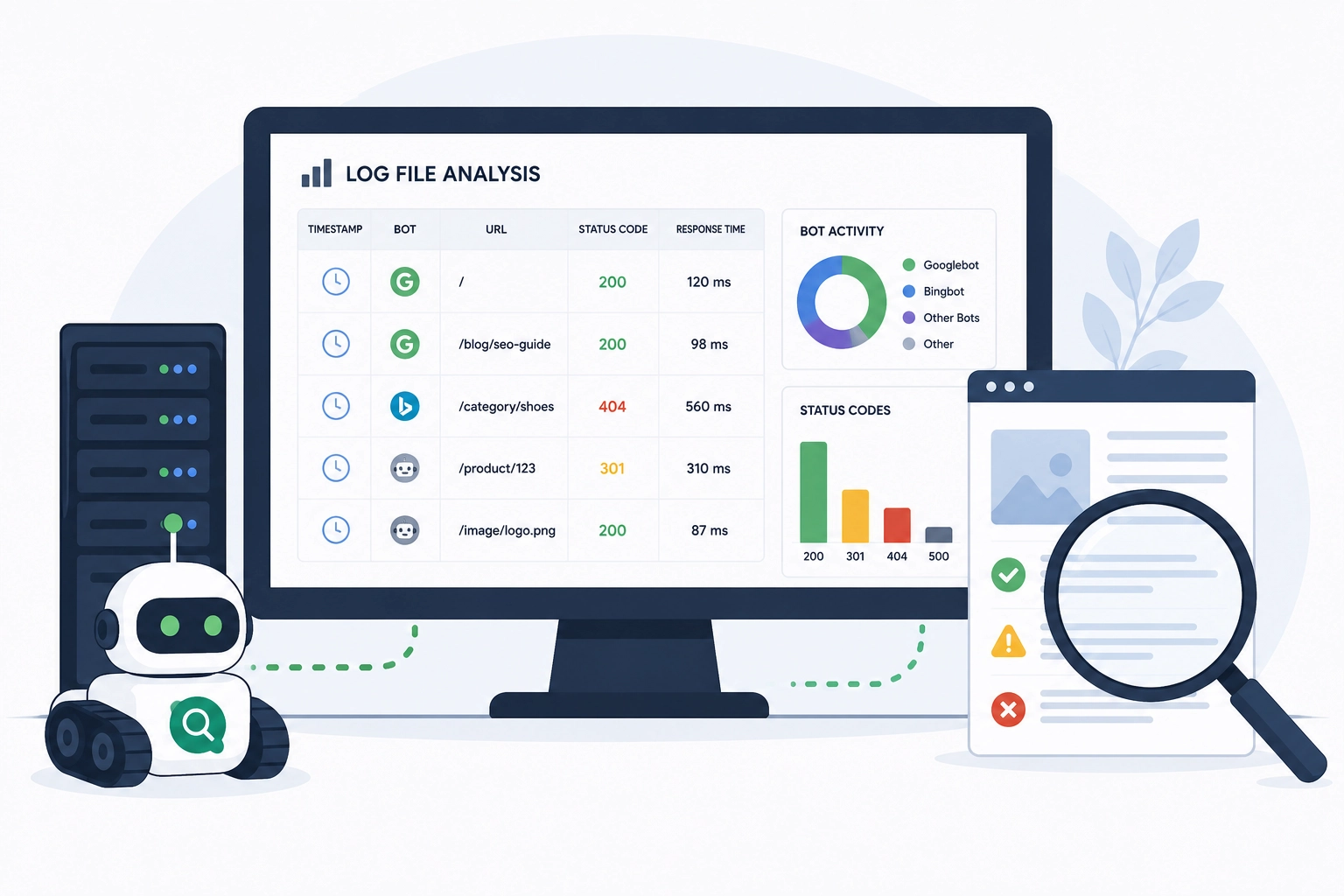
Server records show request-level details from visitors, bots, and automated systems. A typical log format includes the request URL, response code, request time, user agent, and source IP address. These fields help technical teams separate human visits from search engine bots.
A server record may show that Googlebot requested a service page and received a 200 status code. If the same URL returned a 404, 500, or a long response time, the page would need a technical review. Logs can also show requests for HTML pages, images, CSS files, and JavaScript files.
Common formats include Combined Log Format, W3C Extended Log Format, Apache logs, NGINX logs, IIS logs, and Amazon Elastic Load Balancing logs. Before analysis, confirm which fields are available in the export. The file format matters because each source may label fields differently.
How to Analyze Log Files
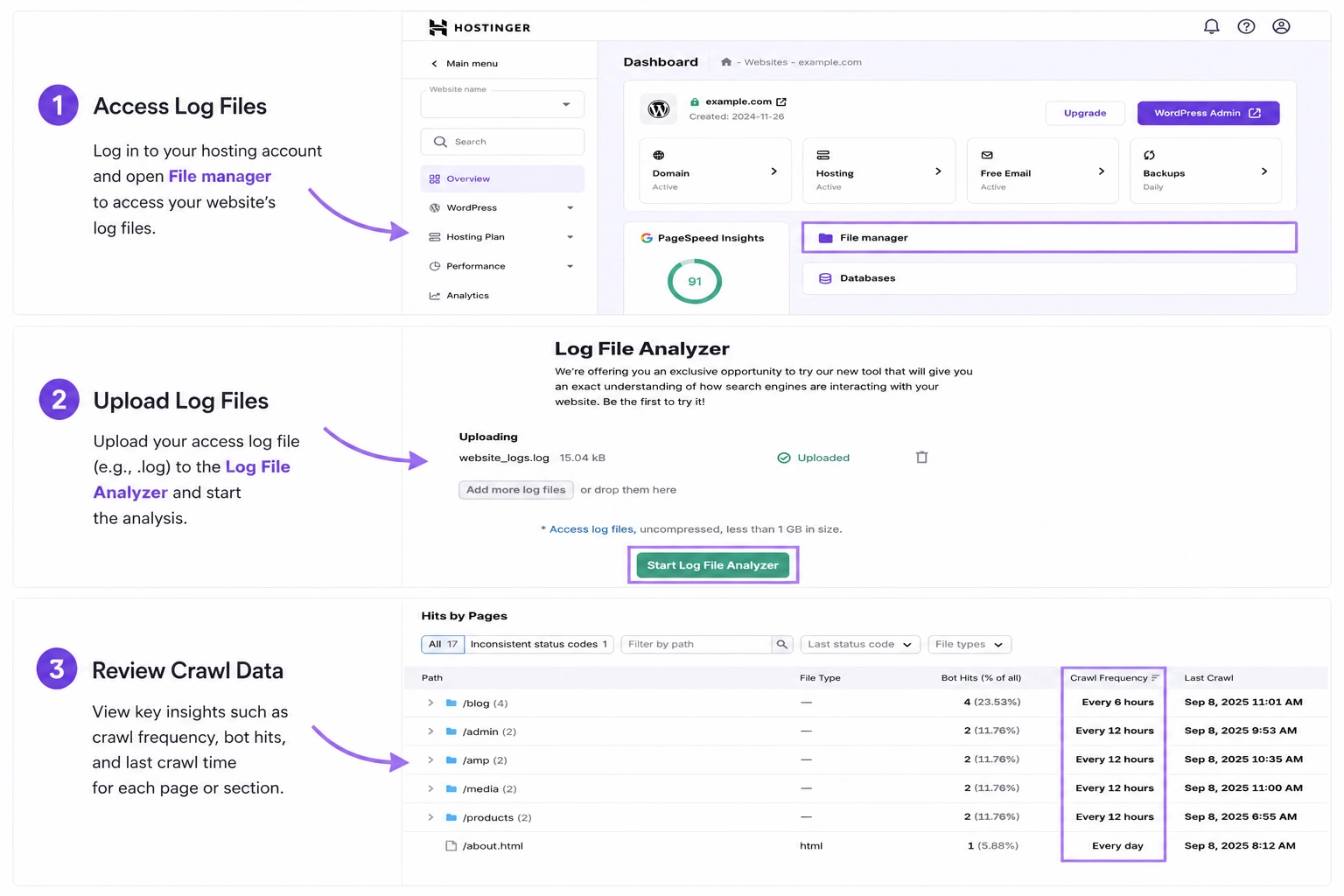
The process starts with complete server records from your hosting setup, CDN, or server platform. A 30 to 90-day range can show useful search engine access patterns for many websites. The goal is to identify which bots to review, which URLs matter most, and which technical signals need action.
Not every bot using a Google-like name is real. Teams should verify major bots through user-agent checks, IP address reviews, reverse DNS lookups, and official crawler documentation. This reduces false conclusions from spoofed crawlers, scrapers, uptime tools, and automated systems.
Next, group URLs by type, such as product pages, service pages, blog posts, filters, media, and parameters. Compare server data with site audit exports, XML sitemaps, canonical tags, internal links, backlink data, and SEO data science methods. This helps identify orphan pages, weak linking, outdated sitemaps, and bot traps.
Common SEO Issues Found
Server records often reveal problems that standard audits miss. They show what bots actually do, not only what tools predict. This makes them useful for advanced technical review.
The most common issues include:
- 404 errors that waste bot requests and point to broken internal or external links.
- 5xx server errors prevent search engines and users from accessing content.
- Redirect chains that increase response time before reaching the final URL.
- Orphan URLs that receive bot visits but are not connected through internal links.
- Slow server responses that reduce processing efficiency, especially on large websites.
- Low-value URLs, such as tag pages, filters, parameters, and duplicate paths, consume unnecessary search engine resources.
Important URLs should consistently return a 200 status code when they are available for indexing. Reviewing these issues together helps prioritize technical fixes based on actual server activity rather than assumptions.
Log Analysis Tools and Services
A server log review can be done with spreadsheets, scripts, or dedicated platforms. The best option depends on the website’s size, data volume, team’s skills, and the review goal. Smaller sites may only need basic filtering, while larger sites often need tools that can process more records.
Common options include:
- Spreadsheets for small exports, simple filters, and manual reviews.
- Scripts for custom parsing, recurring checks, and larger datasets.
- Screaming Frog Log File Analyzer for crawler comparison, bot segmentation, status code review, and visit frequency analysis.
- Log management platforms for large-scale storage, server monitoring, access patterns, and security review.
- Technical audit workflows for connecting server data with site structure, internal links, redirects, and indexability checks.
Technical audits use logs to confirm bot behavior, not just site accessibility. Rodrigo César and Christopher Cáceres may use this data to support technical recommendations in audit work. Any implementation should be reviewed with technical SEO and web development professionals before changes affect crawl control, redirects, or server access.
How to Improve Search Engine Access
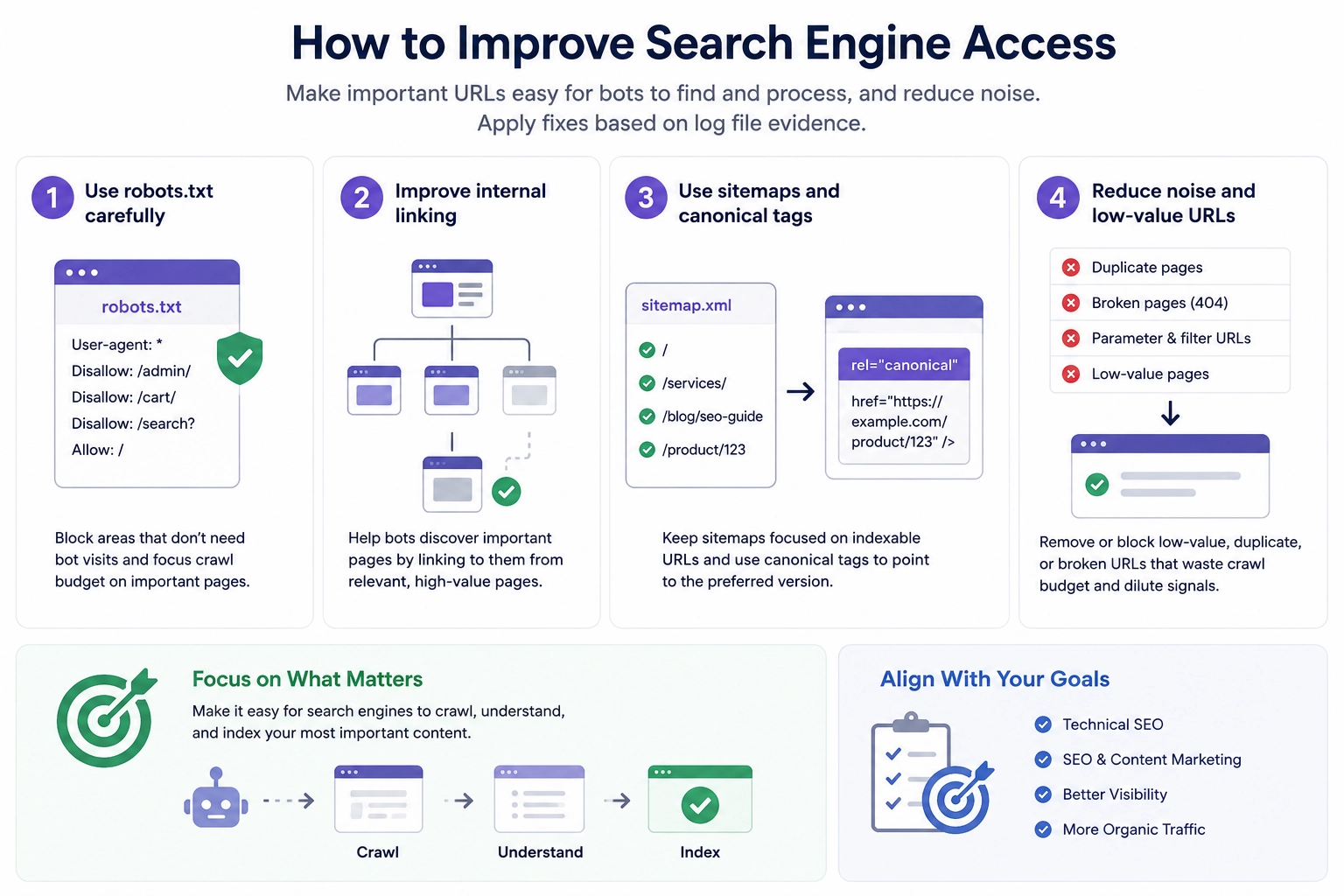
Improving search engine access means making important URLs easier for bots to find and process. It also means reducing noise from duplicate, broken, or low-value paths. The fixes should match the evidence found in the logs.
Use robots.txt carefully to reduce access to areas that do not need bot visits. Improve internal links so important pages are not buried too deep in the site structure. Keep sitemaps focused on indexable URLs, use canonical tags to point to the preferred page version, and align technical fixes with SEO and content marketing goals.