


This guide from SSinvent explains what Google allows and what to avoid. It also shows how to review page elements that are not immediately visible. The goal is to help users and search engines see the same useful information.
Key Takeaways
- Page details that are not shown at first can be safe when they help navigation, mobile use, access, or layout, and users can open or find them.
- Invisible text becomes risky when used to manipulate search rankings through invisible keyword blocks, hidden links, or cloaking.
- Google reviews these elements based on intent, access, and whether users and search engines receive the same useful information.
- A proper audit should check rendered HTML, CSS rules, JavaScript, mobile layouts, and collapsed sections.
- Safe search practices focus on user experience, clear design, open access, and avoiding tactics like hidden keywords SEO that serve search engines more than users.
Does Hidden Content Affect SEO?
Page details that are not shown at first can affect search engine rankings. The result depends on why they exist on a web page. Google can process many tabs, accordions, JavaScript elements, and mobile menus when users can access them.
Problems start when hiding text or hiding content is used to manipulate search visibility. John Mueller has said in public search talks that text in tabs or accordions can still be indexed when it helps user experience. Google Search looks at access, consistency, and intent.
What Is Hidden Content?
This term refers to text, links, images, metadata, or markup that exists in HTML, CSS, or JavaScript but is not displayed immediately. Examples include FAQ answers in accordions, mobile menus, tabbed product details, and screen reader text. Some sites also use noscript tags as fallback text when JavaScript does not load.
Early search engines relied more on simple keyword signals. Some site owners used invisible keyword lists to influence rankings. That history made hidden text SEO a risk area. Google now checks whether an element helps users or tries to manipulate search results.
Safe vs Risky Page Elements
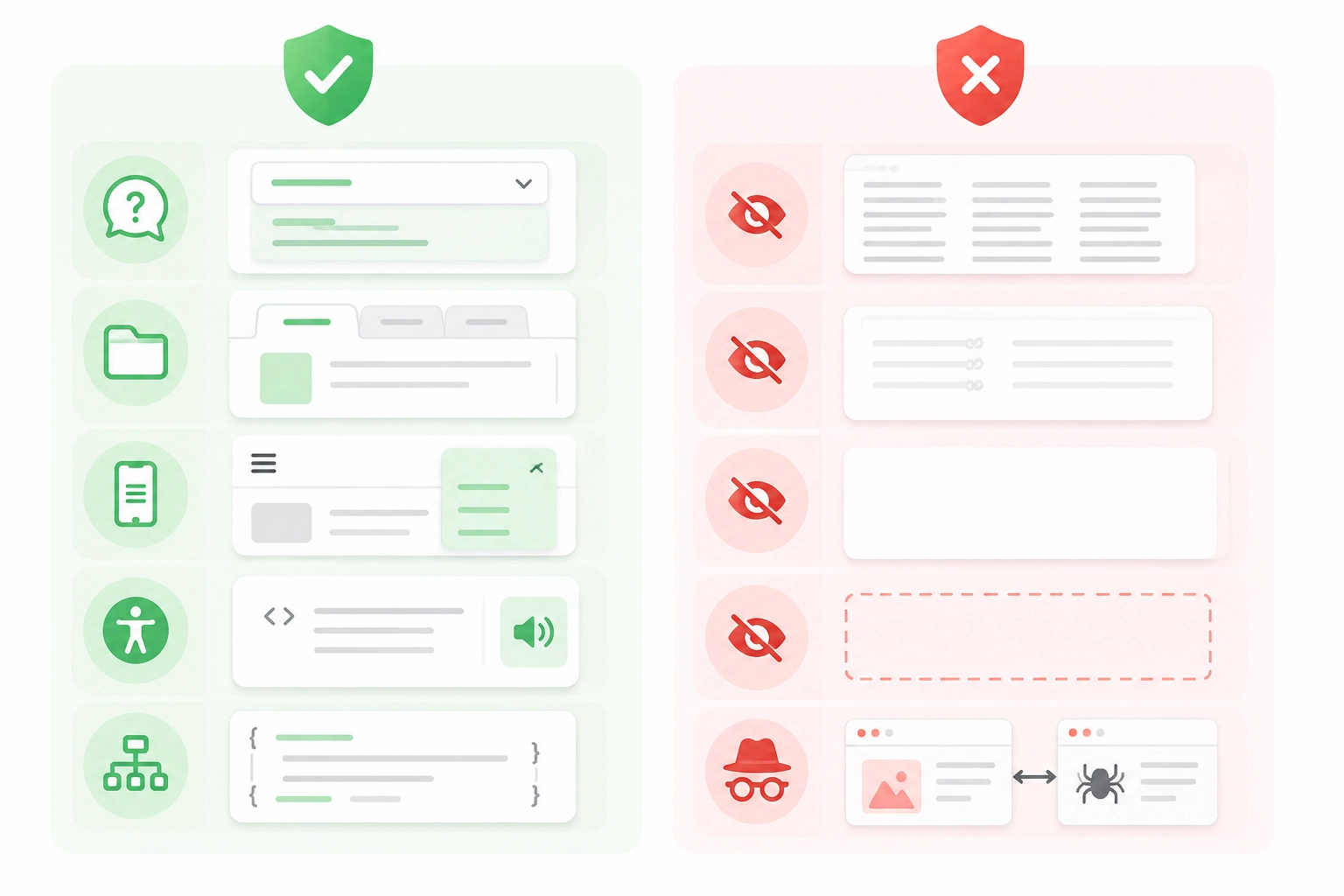
Safe uses include:
- FAQ answers inside accordions
- Product details inside tabs
- Mobile menus that open on tap
- Screen reader helper text
- Accurate structured data
Risky uses include:
- Hidden keyword lists
- Invisible links
- White text on a white background
- Off-screen text blocks
- Cloaked material for crawlers
Acceptable Uses for Collapsed Elements
Safe page elements often help layout, access, or navigation. Tabs, accordions, filters, and menus can make long pages easier to scan. These SEO techniques are common on e-commerce, service, and education pages.
Accessibility text and alt text can also be valid. They should describe real page elements. Schema markup and metadata can help Google Search when they match visible text. They should not add claims, offers, or details that users cannot check on the page.
When Hidden Text SEO Is Risky
Non-visible text becomes risky when a site hides words or links to influence rankings. Common examples include keyword stuffing, invisible links, hidden keywords SEO, and text that users cannot access. These tactics are often tied to black hat SEO.
Risky CSS patterns include matching the background color, setting font size to zero, using font-size:0, display:none, visibility:hidden, opacity:0, or moving text off screen. White backgrounds with white text on a white background are a classic spam example. The same issue can occur with black text on a black background, or with any low-contrast background color trick.
Cloaking is also risky. It shows one version to users and another to crawlers. A page may show normal text to visitors but send keyword-heavy text to Googlebot. This can break spam rules and lead to hidden text penalties.
How Google Handles Collapsed or Non-Visible Elements
Google renders many pages in a browser-like system. It can often process CSS, JavaScript, tabs, and responsive layouts. Crawling finds URLs and resources. Rendering reads layout and scripts, and indexing stores what Google understands.
Broken scripts, blocked files, or slow API responses can stop key text from being processed. JavaScript-loaded material should be checked in rendered HTML. Do not rely on noscript tags as the main place for ranking-critical text. The visible and rendered version should include the main answer.
Interstitials can also block access. Legal notices, age gates, cookie banners, and region selectors may stop users or crawlers from reaching the main text. If Google cannot access the key material, the page may not be understood well.
How to Audit Page Elements Not Shown at First
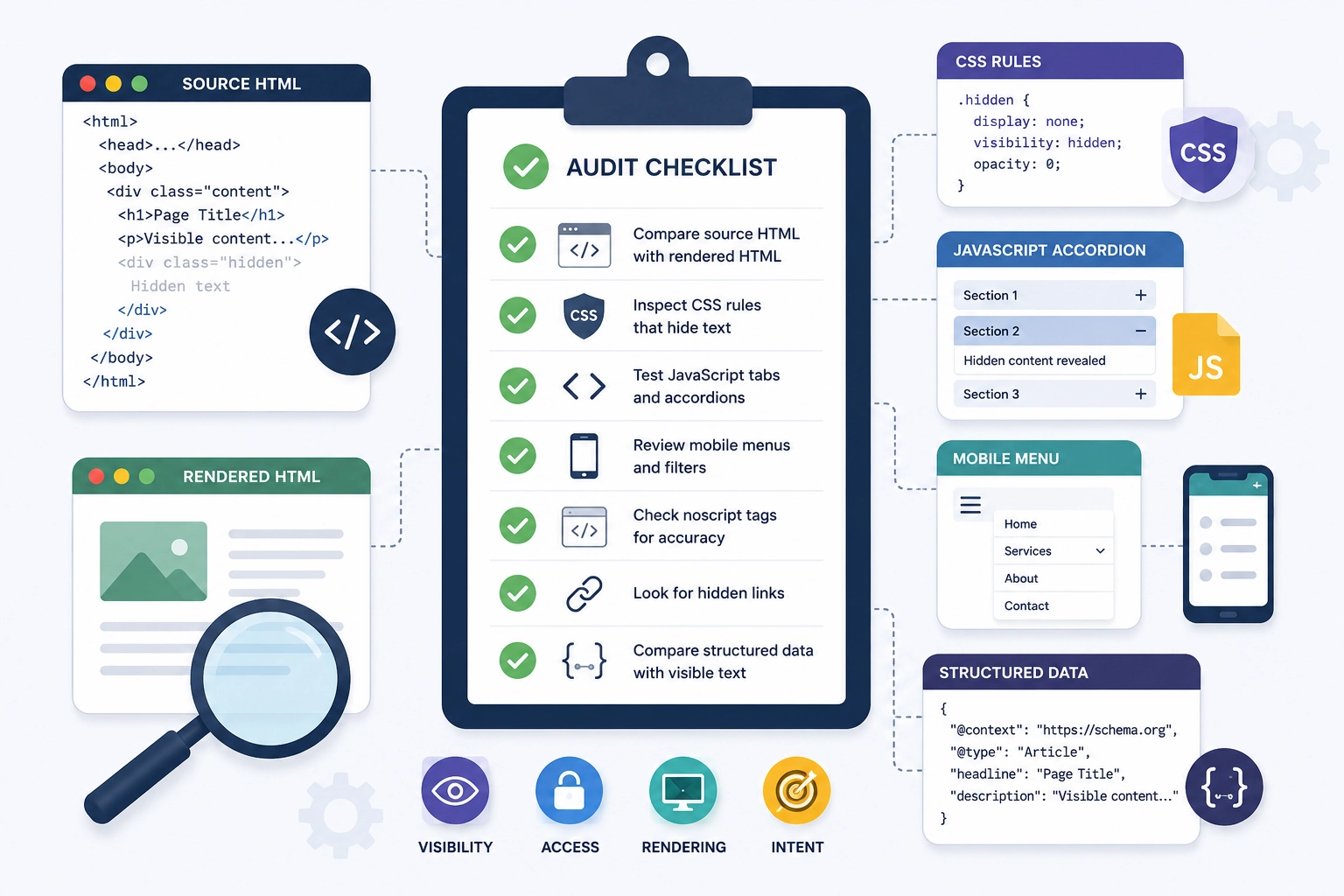
An audit should check visibility, access, rendering, and intent. Compare source HTML with rendered HTML. Inspect CSS rules, test JavaScript tabs and accordions, and review mobile menus. Rodrigo César and Christopher Cáceres approach these checks as technical reviews tied to page purpose and readability.
Use this checklist during review:
- Compare source HTML with rendered HTML
- Inspect CSS rules that hide text
- Test JavaScript tabs and accordions
- Review mobile menus and filters
- Check noscript tags for accuracy
- Look for hidden links
- Compare structured data with visible text
- Confirm users can access key information
Search Best Practices for Collapsed Sections
Keep the main answer visible. Use collapsed sections for support details. Make key information easy to access with clear labels, buttons, arrows, and section names. Avoid hiding links, keyword blocks, or paragraphs that users cannot access, as this can create quality issues similar to thin-content SEO.
A clean page should give users and search engines the same useful information. Do not use tiny fonts, hidden links, off-screen keyword blocks, or background color tricks. Safe use supports readability, access, and trust.
Editorial Review and Technical Accuracy
This article should include a short reviewer note when published. The note can state that Rodrigo César and Christopher Cáceres reviewed the article for search accuracy, technical clarity, and alignment with current guidance.
This supports accountability without making performance promises. If the article is reused across other sites, review content syndication SEO practices to avoid duplicate or unclear source signals.