


At SSinvent, Rodrigo César and Christopher Cáceres evaluate these factors as part of technical SEO and content planning. This guide explains the benefits, risks, and best practices for updating content without harming search visibility.
Key Takeaways
- Adaptive pages can support organic visibility when core content remains crawlable, indexable, fast, and consistent across users and search engines.
- The main risks include JavaScript rendering issues, duplicate URLs, cloaking, URL parameters, wasted crawl budget, and slow page load times.
- Personalized content works best when it improves relevance through recommendations, location details, or filters without replacing the page’s main topic.
- Technical controls such as canonical tags, structured data, hreflang, mobile parity, and Core Web Vitals help search engines understand changing page elements.
- Regular testing in Google Search Console helps confirm that Google can render, crawl, and index the content correctly.
Are Dynamic Pages Good for SEO?
Adaptive pages can be good for search visibility when they serve useful content, load quickly, and remain accessible to search engines. A dynamic web page may change based on location, behavior, device, language, or user history. This can improve the user experience when the changes match the user’s intent.
The risk starts when Google cannot crawl and index the content correctly. If important text, links, or metadata only appear after complex scripts run, search engines may miss key information. A strong SEO strategy keeps the main content accessible while allowing useful personalization.
What Is Dynamic Content?
Dynamic content is page content that changes based on data, rules, or user interactions. It may show different products, messages, prices, recommendations, or calls to action to different users. This approach often appears on e-commerce sites, SaaS websites, news platforms, and social media feeds.
In Search Engine Optimization (SEO), changing content systems must still support clear crawling, indexing, and relevance. The goal is not just to change the page. The goal is to show useful content while keeping the page understandable for users and search engines.

Common Content Personalization Examples
Common examples include product recommendations, location-based service pages, personalized banners, search filters, logged-in dashboards, and client-side single pages. An e-commerce site may show related products, while a travel site may adjust destination offers, language, or local currency. These examples can help users when the content is based on their intent and remains crawlable and useful.
Main SEO Problems With Adaptive Pages
The main problem with adaptive page content is that search engines may not see the same complete page that users see. This can affect crawling, indexing, relevance, and search engine rankings. Problems often come from JavaScript rendering, duplicate URLs, weak canonical signals, URL parameters, or slow page load performance.
Changing systems can also create many low-value URLs through filters, tracking parameters, search results, or session-based pages. This can waste crawl budget and make important pages harder to discover. A clean URL structure, XML sitemaps, canonical tags, robots.txt, and noindex directives can help guide crawlers.
Crawlability, Indexing, and Duplicate Content
Search engines need access to important text, links, images, and metadata. If a page hides core content behind scripts, forms, tabs, or session-based logic, crawlers may not capture it correctly. This can prevent the page from ranking for relevant queries.
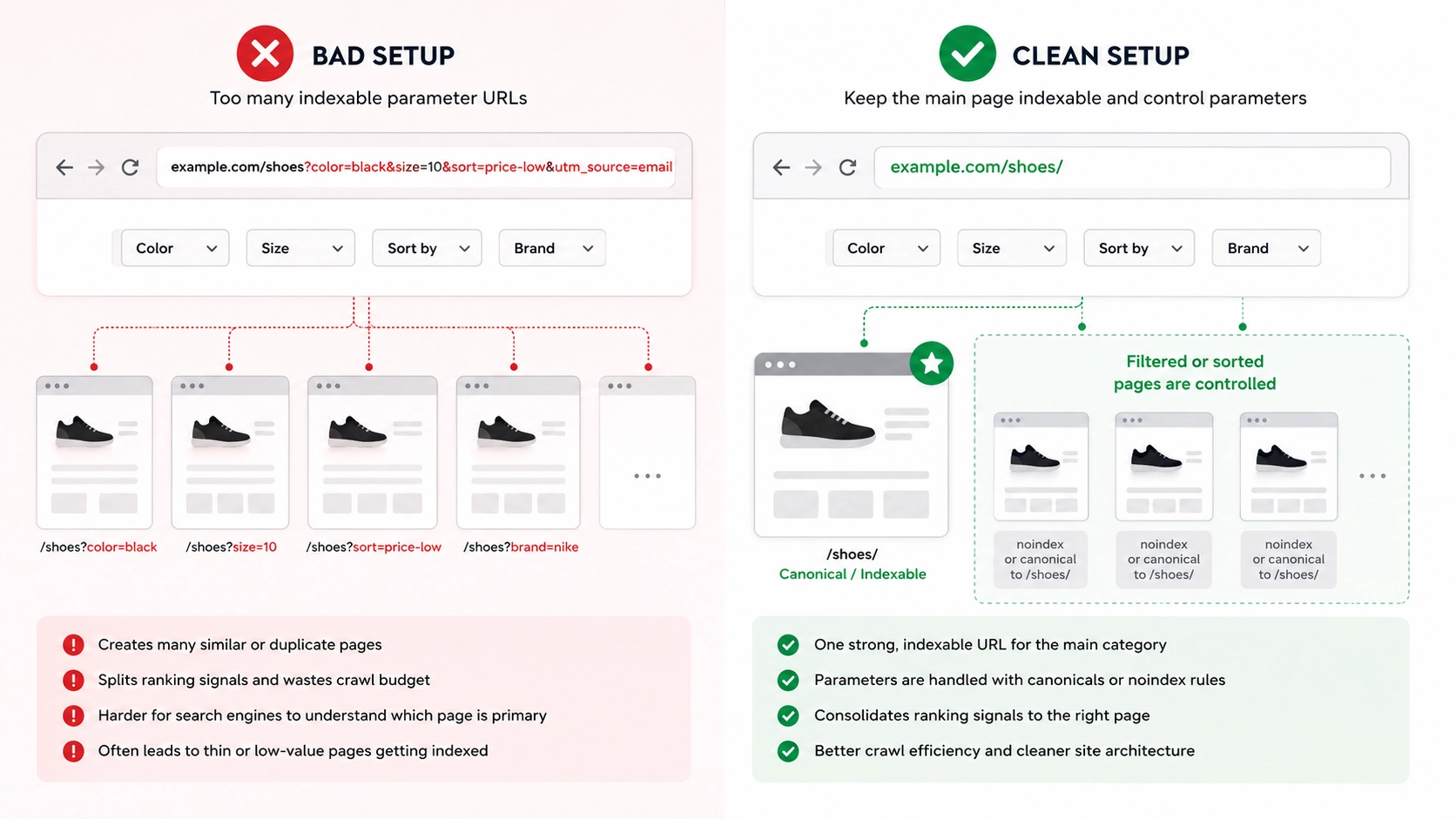
Adaptive pages can also create duplicate content when filters, parameters, or tracking URLs generate many versions of the same page. For example, product pages may appear at different URLs due to sorting, color filters, or campaign tags. Canonical tags, parameter rules, and clean internal linking help reduce this issue.
Cloaking, Parameters, and Speed
Cloaking occurs when a site shows search engines one version of content and users another, with the intent to manipulate rankings. Personalization is not the same as cloaking, which serves users while keeping the main content consistent. The page should remain honest, useful, and aligned across versions.
URL parameters can help users sort, filter, track, or search content, but they can also create many similar pages. For example, a category may create versions such as ?color=black, ?size=large, or ?sort=price-low. These systems can also increase load times, reduce load speed, and raise bounce rates when pages rely on heavy scripts, API calls, or third-party tools.
Bad vs Clean URL Parameter Setup
A poor setup allows every filter and sort option to create an indexable URL. For example, /shoes?color=black&size=10&sort=price-low&utm_source=email can create a thin or duplicate version of a stronger category page. A cleaner setup keeps the main category URL indexable, such as /shoes/, while using canonical tags or noindex rules for low-value filter combinations.
A filtered URL may still deserve indexing when it has clear demand and unique value. For example, /black-running-shoes/ can work if the page has unique copy, useful products, and stable internal links. The key is to separate search-worthy pages from temporary filter states.
Benefits for Search and Users
Adaptive page elements can improve relevance by helping users reach the right information faster. A page that adjusts recommendations, examples, or service details can feel more useful than a generic page. This can support better engagement when the main topic remains clear.
Personalized content can guide users to useful next steps, such as related products, local services, or relevant articles. These changes can increase user interactions by addressing real needs. A more relevant page can also help users make informed decisions without changing the page’s core purpose.
How Google Handles Changing Content
Google can process many JavaScript-based pages, but rendering takes extra resources. First, Google crawls the URL and reads the initial HTML, then it may render scripts to see additional content and links. If a script fails, blocks resources, or loads content too late, Google may not see the full page.
Google’s JavaScript SEO documentation explains that JavaScript-based pages go through crawling, rendering, and indexing. This makes testing important because the content users see in a browser may not always match what Google can process. Use Google Search Console’s URL Inspection tool to confirm that key text, links, and structured data appear in the rendered version.
Mobile-first indexing also matters because Google primarily uses the mobile version of a page for indexing and ranking. Mobile and desktop pages should provide the same important content, structured data, headings, and internal links. Adaptive modules should avoid layout shifts, blocked scripts, and slow mobile performance.
JavaScript Rendering and Indexable Elements
JavaScript rendering allows browsers and search engines to process content generated after the initial HTML loads. This can work for search visibility when headings, links, body text, and key media remain accessible. Sites should test rendered HTML, not just the visual page in a browser.
Indexable elements include titles, meta descriptions, headings, body text, images, structured data, and internal links. These elements help search engines understand what the page offers. If they change too often, the page may send inconsistent signals.
Dynamic Content SEO Best Practices
The best approach is to balance personalization with technical clarity. Core content should load in a way that crawlers can process, including the H1, intro, key sections, internal links, and structured data. Adaptive modules can support the page with examples, recommendations, or contextual details.
Important search elements should stay stable, including the title tag, H1, main description, core body copy, internal links, and category text. A product category page can show personalized recommendations while keeping a fixed category description. A service page can show local examples while keeping the main service explanation visible.
Canonicals, Parameters, and Structured Data
Canonical tags help search engines identify the preferred version of a page. They are useful when filters, tracking codes, or parameters create similar URLs. Canonicals should point to the most useful indexable URL and should not conflict with internal links, redirects, or robots rules.
Structured data helps search engines understand products, reviews, FAQs, events, articles, services, and local business details. It should match the visible content on the page. If a product, rating, price, or FAQ appears in structured data, users should also be able to see it.
Google defines canonicalization as the process of selecting the representative URL from a set of duplicate or similar pages. For adaptive pages with filters, tracking codes, or sorting options, canonical tags help clarify which URL should be treated as the main version. This reduces confusion when several URLs display the same or nearly the same content.
Google also states that structured data helps Search understand page content and can support rich result eligibility when it follows the proper guidelines. For pages with changing product details, FAQs, reviews, or local information, structured data should match what users can see on the page. This keeps markup accurate and reduces the risk of inconsistent signals.
Hreflang, Core Web Vitals, and Testing
Multilingual adaptive content needs clear language and regional signals. Hreflang helps search engines determine which version to show users in different languages or regions. Each language or regional page should have its own crawlable URL for organic search.
Core Web Vitals measure loading, interactivity, and visual stability. Improving performance often means reducing unused JavaScript, compressing images, caching assets, and limiting third-party scripts.
Teams should also inspect URLs in Google Search Console, compare source HTML with rendered HTML, test mobile parity, review crawl reports, and track performance with SEO formulas.
Dynamic Content SEO Checklist
Use this checklist to review important pages:
- Confirm that core content loads for users and crawlers.
- Test JavaScript rendering in Google Search Console.
- Use canonical tags for duplicate or similar URLs.
- Control URL parameters and filter combinations.
- Keep titles, headings, and metadata accurate.
- Monitor page speed, load times, and Core Web Vitals.
- Avoid cloaking or misleading crawler-specific content.
- Review indexed pages for thin or duplicate variations.
Changing content can improve search performance by enhancing relevance and keeping technical signals clear. It can also create problems when it hides content, slows pages, duplicates URLs, or sends inconsistent signals. The safest approach is to keep the main page clear, crawlable, fast, and useful, then use personalized elements to improve the user journey.