


In practice, microformats add meaning to visible details such as names, dates, reviews, and event details by using existing HTML instead of a separate data layer. This can help search engines and other tools understand information on the web, though it does not guarantee rankings or rich snippets.
At SSinvent, this topic is treated as part of technical SEO analysis, and professionals such as Rodrigo César and Christopher Cáceres discuss it as a markup and interpretation issue, not a shortcut for results.
Key Takeaways
- Microformats SEO uses class-based patterns in HTML to label visible content, which helps machines interpret a web page without changing how users see it.
- Microformats can support search understanding for people, reviews, blog post details, event details, and product information, but they do not guarantee rankings or rich snippets.
- Microformat markup differs from microdata and schema markup because it relies on existing HTML elements, HTML classes, and the class attribute instead of broader structured data systems.
- The best use cases for microformats are pages with repeated and clearly defined content blocks, where consistent markup improves clarity, parsing microformats, and maintenance.
- Microformats are still useful when they match the content model, but other markup systems may work better for complex data or broader structured-content needs.
What Are Microformats in SEO?
Microformats are small patterns added to HTML to identify a type of data inside content users can already see. They rely on common HTML elements and the class attribute, so they fit inside normal page markup. In SEO, this matters because labeled content is easier to interpret than plain text.
A simple way to understand microformats SEO is as follows: the content stays readable for people, but the code adds structure for software. A web browser still shows the page normally, while tools that support parsing microformats can detect a person, a blog post, or product information. That makes microformats part of technical SEO, content structure, and on-page SEO services focused on clearer page signals.
What Is a Microformat?
A microformat is a set of naming conventions used in HTML classes to describe visible content. Common examples include h-card for a person or organization and h-entry for an article or post. This lets a page communicate meaning through markup, not only through design.
Microformats usually sit next to the text users already read. They often label an author name, date, or location instead of hiding the data elsewhere. That makes them a practical form of semantic HTML.
What Is Microdata in SEO?
Microdata in SEO is another way to label content, but it is not the same as a microformat. Microdata uses item types and properties in HTML, while microformats rely on agreed class names such as h-card, p-name, or dt-published. Users often get these terms mixed up, so clear separation matters.
This difference affects implementation. If a team uses microformat markup, the HTML code will look different from a page using microdata or JSON-LD. Clear terms help SEO and developers avoid mistakes during audits.
Do Microformats Help SEO
Microformats can help SEO by making page content easier to interpret, but their role is limited. Search engines can read structured signals, and they may use those signals to understand content more accurately. In the right context, this can support better interpretation of a web page.
Markup alone does not create trust, authority, or usefulness, which is why understanding why to hire an SEO company can help frame markup as one part of a broader strategy. Microformats enable better structure, but they do not replace strong writing, clear purpose, or accurate information. They work best as one support layer inside a broader SEO strategy.
How Search Engines Read Markup
When search engines crawl a page, they process HTML code to identify content and structure. If the page uses recognizable HTML classes for a person, review, or event, those labels can help systems understand what the visible text represents. This is why microformat markup is often described as machine-readable context added to normal content.
For example, an h-entry can identify a blog post, while an h-card can identify an author or organization. A parser may read a span class or another marked HTML element and connect it to a property such as name, URL, summary, or published date. The page still looks the same to users, but the type of data becomes clearer to machines.
When Micro Tagging SEO Helps
Micro tagging SEO is most useful when a page contains structured facts that are easy to label and important to read correctly. Contact details, reviews, author data, event details, and product information are common examples. These are the areas where markup can reduce ambiguity.
It can also help when content is reused by tools beyond search. If a page includes dates, locations, or profiles, markup can make that information more portable and consistent. This enhances user experience when the result is better interpretation, not when markup is added just to chase features.
Microformat Markup vs Schema Markup
Microformat markup and schema markup both add meaning to content, but they do it in different ways. Microformats are embedded through class-based patterns inside existing HTML, while schema is often added through microdata or JSON-LD. Both can describe content, but they differ in syntax, scope, and current use.
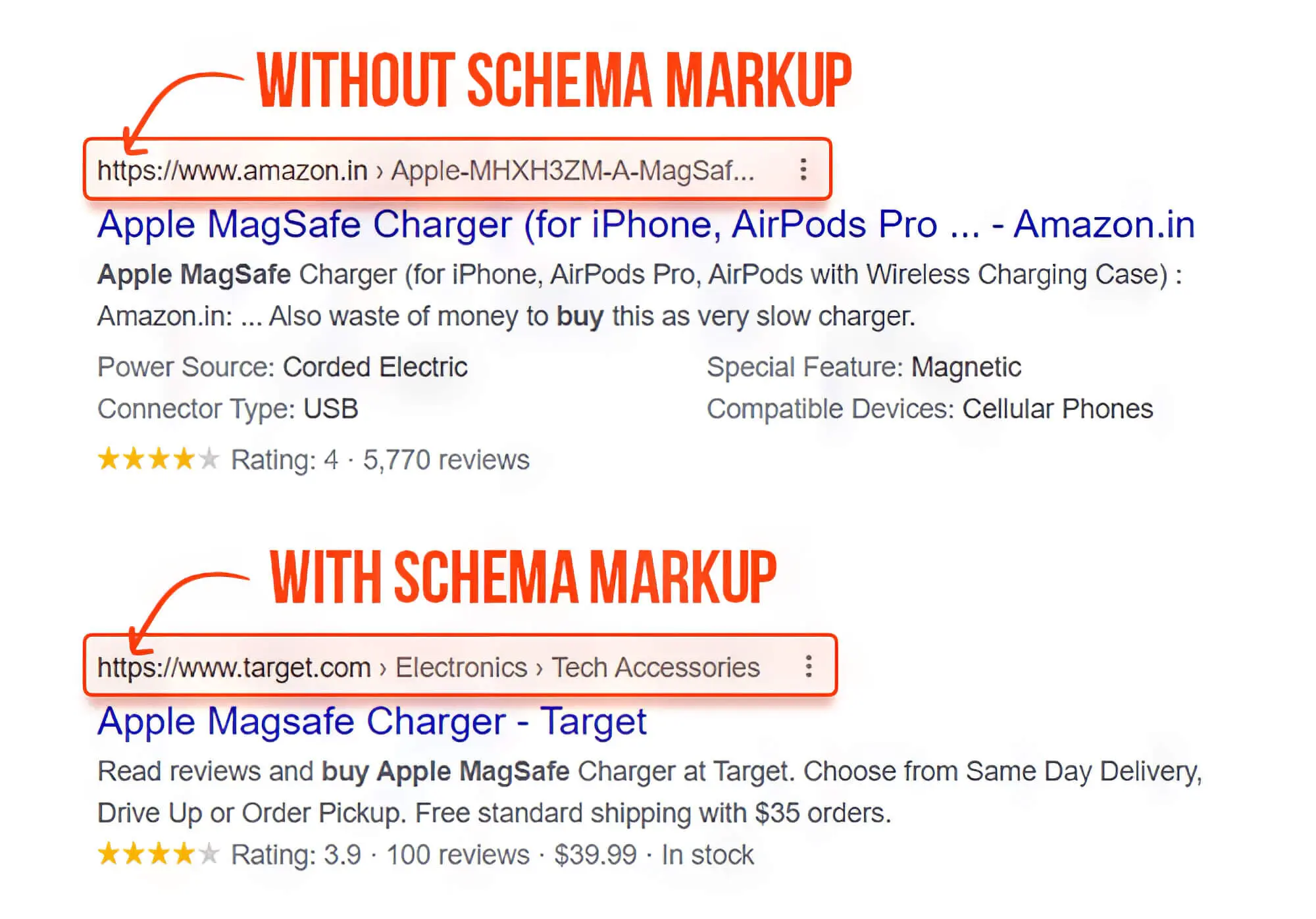
For many teams, the choice depends on the site’s needs. Microformats fit naturally into visible markup and are easy to read in context. Other systems may offer broader vocabularies and more flexibility.
Key Differences in Markup
One key difference is where the meaning lives. With microformats, the meaning usually sits in the class attribute attached to visible content. With other systems, the structured layer may be more separate from what users see.
Another difference is scope. Microformats work well for recurring patterns like people, posts, reviews, and events, but they do not cover every type of data as broadly as larger vocabularies. That is why some teams use microformats for simple semantic HTML and other markup for more complex content.
Which Markup Should You Use
If your goal is to label visible content in a lightweight way, microformats can be a good option. They work well when the page already fits known patterns and the team wants readable markup inside existing templates. They can be useful in editorial, profile, and listing formats.
If your site needs a broader vocabulary or more complex modeling, another markup system may fit better. The best choice depends on the content type, the implementation burden, and whether the markup can stay accurate over time.
When Microformats Are Not the Best Choice
Microformats are less useful when a page needs broader entity relationships, deeper property sets, or a markup model that goes beyond simple class-based patterns. In those cases, another structured approach may fit better. The right choice depends on the content model and maintenance needs, especially when teams are evaluating adaptive SEO solutions for different site structures.
Microformats are usually a weaker fit when:
- the page contains several nested entities
- the content changes often across templates
- the site needs a broader type of data model
- the markup must support many property variations
Where Microformats Work Best
Microformats work best on pages with repeated, clearly defined content blocks. Author pages, review pages, local business details, profile pages, and feeds are common examples. In these cases, the markup supports interpretation without changing the visible design of the web page.
They are less useful on pages with vague or mixed content that does not map well to a recognized pattern. Adding markup to every page is not a sound SEO strategy. The better approach is to use it where it adds clarity.
People, Reviews, Events, and Posts
These are the categories most often linked to microformats. A person or organization can be marked up with an h-card, while an article can use h-entry. Reviews and event details also fit well because they contain recognizable fields such as title, time, place, and author.
These content types often appear in repeated templates, which makes consistent markup easier to maintain. If each blog post follows the same structure, the code can identify title, author, summary, and date in a predictable way. That consistency helps both systems and readers.
Best Content Use Cases
A strong use case is a site that publishes many similar entries with stable fields. A team might label author names, publication dates, excerpts, URLs, and organization data across a publishing system. In practice, this is where microformats can be efficient.
Another good use case is a page with factual content that should not stay as plain text only. If a page includes product information, contact details, or location data, markup can make those values easier to interpret. Rodrigo César and Christopher Cáceres often frame this as a content-structure decision first, not a ranking trick.

How to Add Microformat Markup
Adding microformats usually starts with content you already have. You identify the entity on the page, choose the correct pattern, and attach the right class names to visible HTML elements. The goal is to reflect what the page already says, not invent meaning.
A clean setup also depends on stable templates. If the title, author, and date appear in predictable places, the markup is easier to maintain and test. This reduces the chance that labels drift away from the real content.
Basic HTML Example
A simple example is an author card that labels a person’s name and URL with class names inside normal HTML. A page might use h-card for a profile and h-entry for an article with properties for author, date, summary, and content. These patterns live directly in visible markup.
You might see a div or span class used for a property such as p-name or p-author h-card. The HTML element keeps its visual role, while the class name adds machine-readable meaning. This is why microformats are often discussed as an extension of semantic HTML.
Example of Microformats on a Real Page
Imagine a blog post page with a title, author name, date, and summary. Instead of leaving those details as plain text only, the page can assign HTML classes that identify the author, published date, and post title as structured fields. The layout stays the same for users, but the markup becomes easier for machines to read.
The same idea works for a profile or event page. A profile can label a person’s name, URL, and organization, while an event page can label event details such as name, date, and location. This is where microformats SEO becomes practical because the markup supports interpretation without changing the visible design.
Validation and Common Mistakes
One common mistake is marking up content that does not match what users visualize. If the label says one thing and the page shows another, the markup becomes misleading. Good markup must stay accurate and easy to audit.
Another mistake is inconsistent naming or broken nesting. Pages should be tested after implementation, and the markup should stay aligned with template changes. Quality depends on accuracy, not just on adding HTML classes.
How to Check If Microformats Are Working
After you add microformat markup, confirm that the page still reflects the visible content correctly. A valid setup is not just about adding HTML classes. It is about making sure the labeled values match what users see on the web page.
A practical workflow can be simple:
- Open the page in a web browser.
- Inspect the marked section in the HTML code.
- Confirm the right type of data is labeled.
- Compare the markup with the visible content.
- Retest after template edits.
SEO Principles That Still Matter
Microformats are only one small part of technical SEO. They do not replace content quality, clear page purpose, crawlability, or useful writing. That is why an article about microformats should explain both value and limits.
What Is the 80/20 Rule for SEO
The 80/20 rule for SEO usually means that a small set of actions drives most of the value. In many cases, clear structure, strong content, and sound technical basics matter more than markup details. Microformats may help, but they come after the fundamentals.
What Are the 3 Cs of SEO
The 3 Cs of SEO point to content, code, and credibility. Microformats support content because they help define what a page element represents, however, they do not replace consistency or content quality.
Difference Between SEO and SMM
SEO and SMM (Social Media Marketing) are related but different. SEO focuses on search visibility, while SMM focuses on distribution and engagement through social platforms. Microformats belong more naturally to technical markup than to social media tactics.
Where SEO and SMM Overlap
The overlap is that both benefit from content that is understandable and useful. A well-structured page with clear signals can support discovery in more than one environment. Still, microformats are not a social tactic, they are a markup choice.
Why the Difference Matters
The difference matters because teams often mix channels, promotion, and code into one discussion. Clear definitions lead to better planning. If the issue is in the structure of a page, the fix should happen in the template and markup layer.
Are Microformats SEO Still Worth Using?
Microformats are still worth using when the content fits them, the implementation is accurate, and the team wants lightweight markup inside visible HTML. They remain useful for specific patterns, and search engines can still interpret them. In that sense, microformats SEO still has practical value.
The better view is not that they are essential for every site, but that they are useful in the right context. At SSinvent, subject-matter experts including Rodrigo César and Christopher Cáceres treat markup choices as a question of content structure, maintenance, and clarity.
Where Microformats Fall Short
Microformats fall short when the content model is more complex than their common patterns support. They can also create confusion if teams use them inconsistently or apply them to the wrong content. In those cases, the markup adds noise instead of clarity.
When Other Markup Works Better
Other markup works better when a site needs broader vocabularies, more complex relationships, or workflows that fit modern structured-data systems more closely. In those cases, microformats may be too narrow.
The practical takeaway is simple: use microformats when they match the content and can be maintained accurately.