

Key Takeaways
- A CMS’s SEO capabilities influence how effectively teams manage technical SEO, content structure, and ongoing updates, making system selection a foundational decision rather than a design choice.
- The best CMS for SEO is determined by how well it supports control over URLs, metadata, internal linking, and performance, not by platform popularity or marketing claims.
- Different CMS solutions serve different needs, with free platforms, enterprise systems, and developer-focused or headless CMS each presenting distinct tradeoffs in flexibility, governance, and maintenance effort.
- SEO-friendly CMS features such as XML sitemaps, structured data, mobile-friendly output, and reliable handling of redirects reduce technical risk and support consistent optimization over time.
- Choosing the best content management system for SEO requires aligning technical capabilities with team skills, site scale, and long-term maintenance capacity.
What Is a CMS in SEO
A CMS in SEO is software that manages pages, posts, media, and templates while allowing search engines to crawl and index content. Content management systems influence how URLs are generated, how pages link, and how metadata is displayed. These basics affect indexing and ranking signals. A CMS also shapes how teams apply SEO strategies over time. In practice, a CMS acts as the control layer between content creators and search engines. It translates editorial actions into technical signals, including HTML structure, metadata, and links. When CMS defaults are restrictive or inconsistent, they can weaken SEO strategies. Clear CMS behavior reduces reliance on manual fixes.How a CMS impacts rankings
A CMS controls technical SEO elements such as page load speed, mobile versions, and internal linking. It also affects how easily teams can add alt text, meta tags, and structured data. Poor defaults can block crawl paths or create duplicate URLs. Strong CMS solutions reduce these risks and support consistent optimization.How to Evaluate Which CMS is Best for SEO
Evaluating platforms requires separating features from outcomes, a distinction often discussed when assessing whether SEO services are worth it. The best CMS for SEO offers control, clarity, and stability across content updates. It should support SEO capabilities without heavy workarounds. This section explains how to assess systems before comparing brands. Evaluation should focus on what teams can control without custom development. This includes access to technical settings, content structure, and update workflows. A CMS that requires frequent workarounds increases risk over time. Stable, transparent controls support predictable SEO management.How Google evaluates CMS performance
Google does not rank content management systems by name. It evaluates pages based on technical SEO signals, content quality, and user experience. Factors include mobile-friendly layouts, page load speed, and clean internal linking. A CMS helps or hinders these factors through defaults and configuration options.What SEO results depend on
SEO efforts depend on how well teams can manage content and technical settings. Systems that support XML sitemaps, schema markup, and 301 redirects reduce errors during growth. Control over URLs and templates supports consistency. These conditions matter more than marketing claims about rankings.Best CMS for SEO Platforms Compared
Comparisons are most useful when based on criteria rather than popularity. The best content management system for SEO depends on use case and scale. Research from Rankability, RebelMouse, and Optimizely shows patterns instead of universal winners. At SSinvent, we typically use WordPress for its versatility, but we also work with other CMS platforms like Shopify, Webflow, Hubspot, and Drupal when project needs require it. This section reviews common platform types using shared benchmarks.
Many comparative lists rank platforms without explaining the underlying reasons. Search visibility does not depend only on CMS popularity. It depends on how well the system supports consistent implementation of core SEO capabilities. Platform comparisons provide the most value when they align with specific use cases.
Top CMS platforms
Most rankings list WordPress, enterprise CMS platforms, and modern frameworks near the top. WordPress is widely used for its broad adoption and flexible SEO plugins. Enterprise systems focus on governance and scale. Framework-based tools target developers who want direct control.WordPress, Webflow, and Enterprise CMS
WordPress supports meta tag control, XML sitemaps, and internal linking through plugins. Webflow emphasizes visual control, built-in SEO features, and clean code output. Enterprise CMS options focus on workflows, permissions, and multi-region publishing. Each approach fits different team structures.What SEOs and developers recommend
Users often recommend systems that balance control and ease of use. WordPress often appears due to community support and extensibility. Developer-focused users mention headless tools for flexibility. These views stress usability over branding.Common tradeoffs and limitations
Reddit users highlight issues such as plugin conflicts, scaling limits, and hidden costs. Free tools can require more technical effort. Visual builders may restrict advanced technical SEO tasks. These tradeoffs shape long-term CMS choices.Free and Open-Source CMS for SEO
Free CMS options for SEO, like WordPress, Drupal, and Joomla, attract small teams and early-stage projects. Open-source systems reduce licensing costs and allow customization. They still require planning and technical oversight. This section explains when free tools are appropriate and where limitations arise.When a free CMS works
Free platforms work well for blogs, local sites, and early-stage projects. They support basic SEO features such as meta tags, alt texts, and XML sitemaps. Teams can extend features through community tools and paid extensions. For example, WordPress offers paid plugins and templates that help scale functionality, improve SEO control, and support growth. Success depends on maintenance discipline. Free CMS platforms shift responsibility from vendors to site owners. SEO capabilities may exist, but teams must configure and maintain them correctly. Documentation quality varies by project. This model works best when technical knowledge is available.SEO constraints to expect
Free systems may lack built-in governance or advanced schema markup tools. Performance tuning often falls on the site owner. Support depends on forums rather than service contracts. These factors affect long-term SEO strategies.
Best CMS for Developers and Headless Sites
Developer-focused teams prioritize flexibility and control. The best CMS for developers supports APIs, custom templates, and clean output. Examples include Strapi, Contentful, and headless WordPress. These systems allow developers to define content structure and integrate with modern frameworks. Headless approaches separate content from presentation. This section explains how these systems affect SEO work.What is a headless CMS
A headless CMS stores content and delivers it through APIs. Developers control front-end frameworks separately. This model supports custom workflows and performance tuning. It also requires strong technical SEO planning.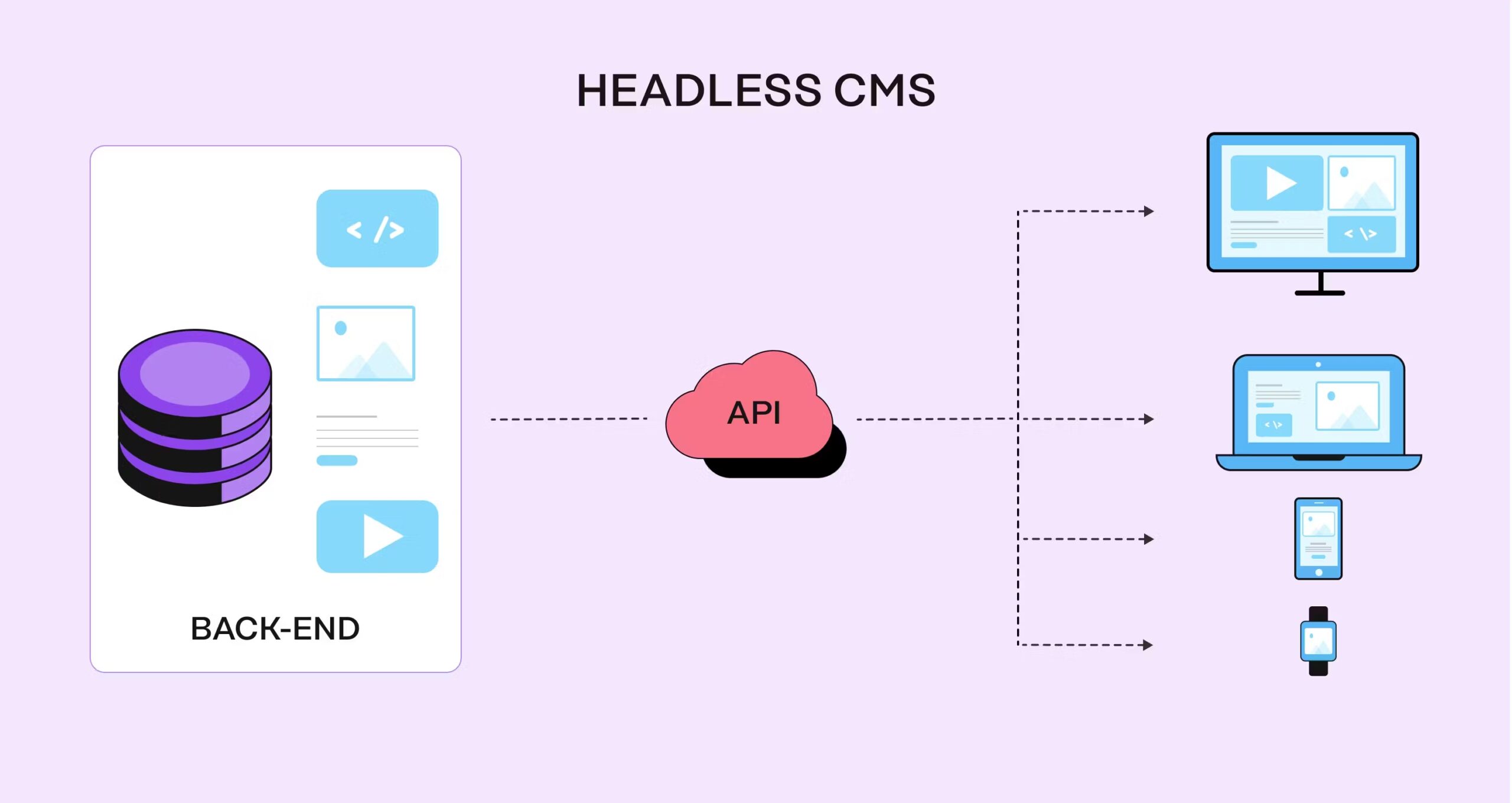 Headless systems do not remove SEO responsibilities. They redistribute them across teams. Developers must ensure proper handling of structured data, xml sitemaps, and internal linking. Without coordination, SEO gaps can appear even on well-built sites.