

PushState SEO does not directly harm rankings, but it can create issues if URLs do not return real content or if a site relies on JavaScript without proper server support. Search engines must access rendered content and index the content associated with each URL, even when navigation occurs without a full page load.
At SSinvent, this topic is often analyzed in the context of modern web development, where dynamic routing impacts visibility. The following sections explain how pushState works, how it interacts with crawling, and how to implement it correctly.
Key Takeaways
- PushState SEO does not directly affect rankings, but it can prevent pages from being indexed by search engines if URLs do not return real, accessible content.
- The pushState method improves user experience by updating the address bar without a full page load, but each URL must still deliver rendered content independently.
- Search engine crawlers process pages through crawling, rendering, and indexing, so sites that rely on JavaScript must ensure all critical content is visible during rendering.
- Proper implementation requires server-side routing, crawlable links, and correct HTTP status codes to ensure pages can be discovered and indexed.
- Using pushState and replaceState correctly, along with testing rendered output and indexing status, helps maintain both technical performance and search visibility.
What is PushState?
PushState is part of the History API and allows developers to change the URL displayed in the browser without refreshing the page. It is commonly used in single-page applications (SPAs) to create dynamic navigation.
This method helps maintain a consistent interface while updating content in the background. It creates a seamless browsing flow that improves interaction and reduces loading delays.
How the History API Works
The History API provides methods to manipulate the browser history, including pushState and replaceState. These methods let developers control navigation behavior without relying on full page reloads.
When pushState is used, a new history entry is added. When replaceState is used, the current entry is modified instead of creating a new one.
URL Changes Without Page Reload
When pushState runs, the address bar updates instantly. The browser does not reload the page; instead, JavaScript fetches and displays new content.
This requires proper handling of events such as the popstate event. Without it, users may experience broken navigation when using the back and forward buttons.
Does PushState SEO Affect Rankings?
PushState SEO does not directly affect rankings, but it influences how search engines crawl and index web pages. If the implementation prevents search engine crawlers from accessing content, pages may not be indexed. This creates visibility issues even if the content itself is relevant.
The main risk appears when a site relies on JavaScript to load content dynamically without providing a fallback. If the URL shown in the address bar does not return usable HTML, search engines cannot properly index the content. This can reduce the number of pages that appear in search results and may contribute to fluctuations explained in rank volatility SEO.
How URLs Change Without Reload
The pushState method allows developers to manipulate the browser history without triggering a full page load. When a user clicks a link, the URL updates and a new history entry is created, but the page does not reload.
This approach improves user experience because navigation feels faster and smoother. However, the content must still be accessible through that URL if someone visits it directly.
Why Real Pages Matter for Google
Search engines expect each URL to return meaningful content. If a page loads content only via JavaScript after user interaction, the crawler may not see it.
To remain SEO friendly, every URL should work independently. When accessed directly, it should return HTML that search engines can process and index.
How Google Crawls and Renders JavaScript
Google processes pages in stages that include crawling, rendering, and indexing. This process becomes more complex when a site relies on JavaScript.
Search engine crawlers first discover the URL, then render the page using a browser engine. After rendering, they index the content they can see.
Crawl Render Index Process
The crawler retrieves the page and identifies resources such as scripts and styles. Then, it renders the page to generate visible content.
Finally, Google attempts to index the content based on what is rendered. If important data is missing during rendering, indexing may fail.
Rendering Delays and Limitations
Rendering does not always happen immediately. It can be delayed, especially for complex pages that rely heavily on JavaScript code.
If resources are blocked or fail to load, the rendered content may be incomplete. This affects whether pages are indexed by search engines.
PushState vs ReplaceState for SEO
PushState vs replaceState is an important distinction for developers managing dynamic navigation. Both methods belong to the history API but behave differently.
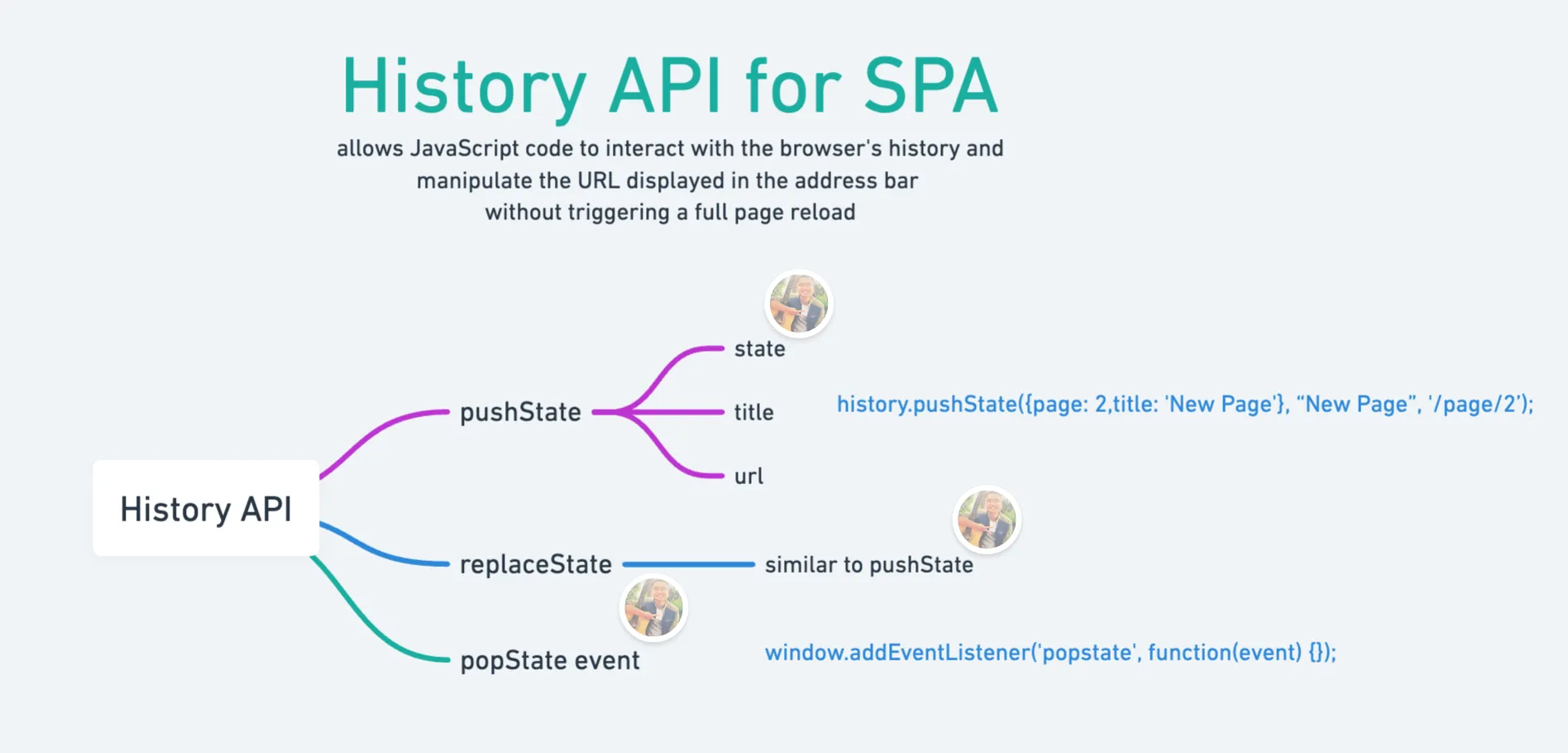
PushState creates a new history entry, while replaceState modifies the current one. This difference affects navigation and user interaction with the browser history.
Key Differences Explained
PushState is used when a new page view occurs. It signals a meaningful change in content that deserves its own URL. ReplaceState is used for minor updates, such as filters or sorting. It avoids cluttering the browser history with unnecessary entries.
When to Use Each Method
Use pushState when content changes significantly and should be accessible through a unique URL. This supports indexing and improves clarity for search engines.
Use replaceState when updating state without changing the core content. This maintains a clean navigation flow without affecting indexing.
PushState SEO Example and Tutorial
A pushState SEO example helps illustrate how dynamic navigation works in practice. Consider a product listing page that loads new items without a full page reload.
When a user selects a category, pushState updates the URL. The page then loads new content using JavaScript code.
Dynamic URLs
The URL changes in the address bar, but no page load occurs. This creates a smooth browsing experience. However, the same URL must return the correct content when accessed directly. Otherwise, search engines cannot index the content.
Step-by-Step Setup
To implement pushState correctly:
- Update the URL using the pushState method
- Load content dynamically using JavaScript
- Ensure the server returns HTML for that URL
Rodrigo César and Christopher Cáceres often highlight that proper setup requires both frontend and backend coordination.

Technical Setup for PushState SEO
A proper pushState server setup ensures that all URLs return valid responses. This is essential for crawling and indexing, especially when implementing advanced SEO services that support technical optimization.
Without server support, dynamic routes may fail when accessed directly. This creates gaps in search visibility.
Server-Side Routing
Server-side routing ensures that each URL returns content even without JavaScript. It maps dynamic paths to real responses. This approach supports search engine crawlers and improves reliability across different environments.
SSR vs CSR vs Prerendering
Server-side rendering generates HTML on the server before sending it to the browser. Client-side rendering depends entirely on JavaScript. Prerendering creates static HTML snapshots for dynamic pages. Each method has trade-offs related to performance and Core Web Vitals.
Common Issues and Best Practices
PushState SEO issues often come from incomplete implementation. These issues can prevent pages from being indexed by search engines. Fixing them requires attention to both frontend behavior and server responses.
Non-Crawlable Links
Links that rely only on JavaScript events are not always crawlable. Search engines prefer standard anchor tags. Use proper links so crawlers can discover pages naturally.
Missing Server Responses
If a URL does not return content from the server, it cannot be indexed. This often happens in SPA setups. Ensure every route returns meaningful HTML.
Blocked Resources
Blocked scripts or styles prevent rendering, resulting in incomplete content. Always allow access to essential resources.
Use Crawlable URLs and Internal Links
Each page should have a unique, accessible URL. Internal linking helps search engines discover content. This supports indexing and improves site structure.
Handle HTTP Status Codes
Correct status codes signal the state of a page. A valid page should return a 200 status code, while missing pages should return a 404 status code. This helps search engines understand how to index the content.
JavaScript SEO Checklist
A checklist helps ensure that implementation supports indexing:
- Provide HTML content for every URL
- Allow search engine crawlers to access resources
- Use crawlable links
- Test rendered content
This simplifies validation and reduces errors.
SEO Strategy and Key Concepts
SEO strategy supports how content is structured and discovered. Even technical implementations rely on clear keyword targeting.
What is a keyphrase in SEO?
A keyphrase represents the main query a page targets. It helps search engines match content to user intent.
SEO Keyphrase Examples
Examples include queries such as “pushState SEO” or “JavaScript SEO”. These guide content structure and optimization.
4 Pillars of SEO
The main pillars include:
- Technical setup
- Content
- Authority
- User experience.
Each plays a role in visibility.
3 Cs of SEO
The 3 Cs refer to content, code, and credibility. Together, they support performance and trust.
80/20 Rule for SEO
A small portion of pages often drives most traffic. Focus on improving high-impact pages first, which aligns with strategies like content pruning for SEO to remove low-value pages. Focus on improving high-impact pages first.
How to Test Pushstate SEO Performance
Testing ensures that pages work as expected and can be indexed. It confirms that both content and structure are accessible.
Use Google Search Console
Google Search Console helps identify indexing issues. It shows whether pages are indexed by search engines.
Inspect Rendered Pages
Check the rendered content to confirm that important elements appear correctly. This verifies that JavaScript code does not block visibility.
Christopher Cáceres emphasizes that testing should include both a crawler perspective and user experience validation.