

This issue also affects user experience because visitors may land on outdated, thin, or less useful versions of a page. For site owners, it can make performance harder to measure because clicks, links, and rankings may be spread across multiple URLs rather than a single strong page.
At SSinvent, duplicate content is treated as both a technical and content-quality issue because fixing it requires clear URL signals, stronger internal links, and original content that gives each page a distinct purpose.
Key Takeaways
- Duplicate content can slow SEO growth by splitting ranking signals, diluting backlinks, wasting crawl budget, and causing Google to rank the wrong page.
- Google usually filters out similar pages and chooses a single canonical version rather than applying a direct duplicate-content penalty.
- Common causes include URL parameters, URL variations, HTTP/HTTPS or www variations, repeated product or service copy, boilerplate templates, syndicated content, and scraped content.
- The right fix depends on the issue. Canonical tags, 301 redirects, noindex rules, content consolidation, and rewriting address different types of duplicate content problems.
- Regular audits help site owners catch duplicate URLs, conflicting canonicals, repeated metadata, weak internal links, and overlapping content before they affect search visibility.
How Does Repeated Content Affect Organic Visibility?
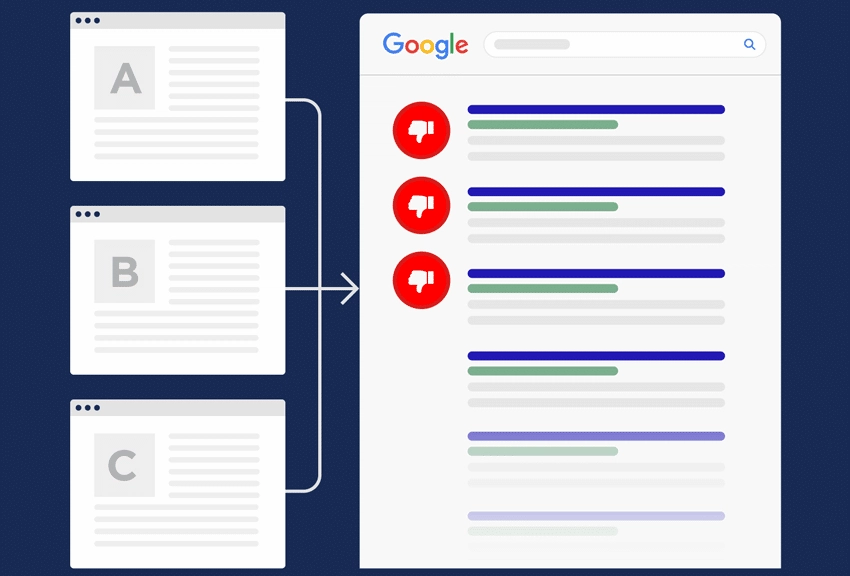
Repeated or highly similar pages can affect how Google crawls, indexes, and ranks a website. When multiple versions of the same material exist, Google may choose one page and ignore the rest. This can reduce organic visibility even when the site has useful information.
Ranking signals work best when they point to one clear URL. If several pages target the same query, backlinks, engagement signals, and internal links may spread across different versions. This can weaken the authority of the page that should appear in search results.
Repeated URLs can also waste crawl budget. Google may spend time crawling parameter URLs, filters, URL variations, or low-value pages instead of important content. This matters more for large sites, e-commerce websites, and blogs with many archives or tags.
What Duplicate Content in SEO Means
This term refers to the same or very similar material appearing across multiple URLs. It can happen within a single website or across multiple websites. It may involve full copies, repeated sections, boilerplate templates, duplicated pages, or pages that change only a few words.
Similar content is not always a problem. For example, service pages in different locations may share a format while still adding unique local details, examples, and search intent. Problems appear when pages do not add enough original content to justify separate indexing.
This issue is different from plagiarism. In most cases, repetition creates a visibility and indexing problem because Google must choose which version to show. Plagiarism is a legal, ethical, or editorial issue because one source may copy another without permission or credit.
Does Google Penalize Duplicate Content?
A repeated content penalty is less common than many site owners think. In most cases, Google filters similar pages instead of applying a manual action. The result can still hurt performance because filtered pages may not appear where expected.
The risk increases when a site creates many low-value pages targeting the same intent. It also poses a risk when material is copied from other sources without adequate context. A better approach is to consolidate weak pages, improve unique value, and send clearer technical signals.
Google may choose a preferred page by reviewing canonical tags, redirects, sitemap URLs, internal links, page quality, and external links. A rel canonical tag helps identify the preferred version when multiple versions of the same content exist, but it should match the rest of the site’s signals. If the sitemap, navigation, and canonicals conflict, Google may choose a different URL.
Common Causes of Duplicate Content
This problem often comes from technical structure, templates, or content reuse. The most common causes include:
- URL parameters from filters, sorting, tracking, or session IDs.
- URL variations caused by inconsistent formatting or duplicate paths.
- HTTP and HTTPS versions that both remain accessible.
- WWW and non-WWW versions that are not redirected properly.
- Reused product descriptions across multiple product pages.
- Repeated city pages that only swap the location name.
- Syndicated articles, including content shared through article submission, that appear on more than one website.
- Scraped copy taken and republished by another domain.
- Repetitive meta descriptions created by templates.
E-commerce sites often face this issue when product variants, filtered categories, sorting options, or manufacturer descriptions create many similar pages. Service businesses can face the same issue when location pages only swap the city name.
Stronger pages include distinct details, useful examples, and internal links that align with the page’s specific purpose.
How to Find Duplicate Content
Google Search Console can help identify indexing issues caused by repeated or overlapping pages. Common statuses include “Duplicate without user-selected canonical,” “Google chose a different canonical than user,” and “Alternate page with proper canonical tag.” These labels show whether Google accepts your preferred URL or has selected another version.
SEO crawlers can identify repeated titles, H1S, meta descriptions, similar page copy, canonical conflicts, and parameter patterns. Manual checks can also help. Search for an exact text snippet in Google to see whether the same copy appears on other pages or domains.
Not every finding needs a fix. If Google selects the intended canonical page and users still have a clear path, the issue may only need monitoring. The priority should be pages that receive traffic, earn backlinks, support conversions, or target important keywords.
How to Fix Duplicate Content
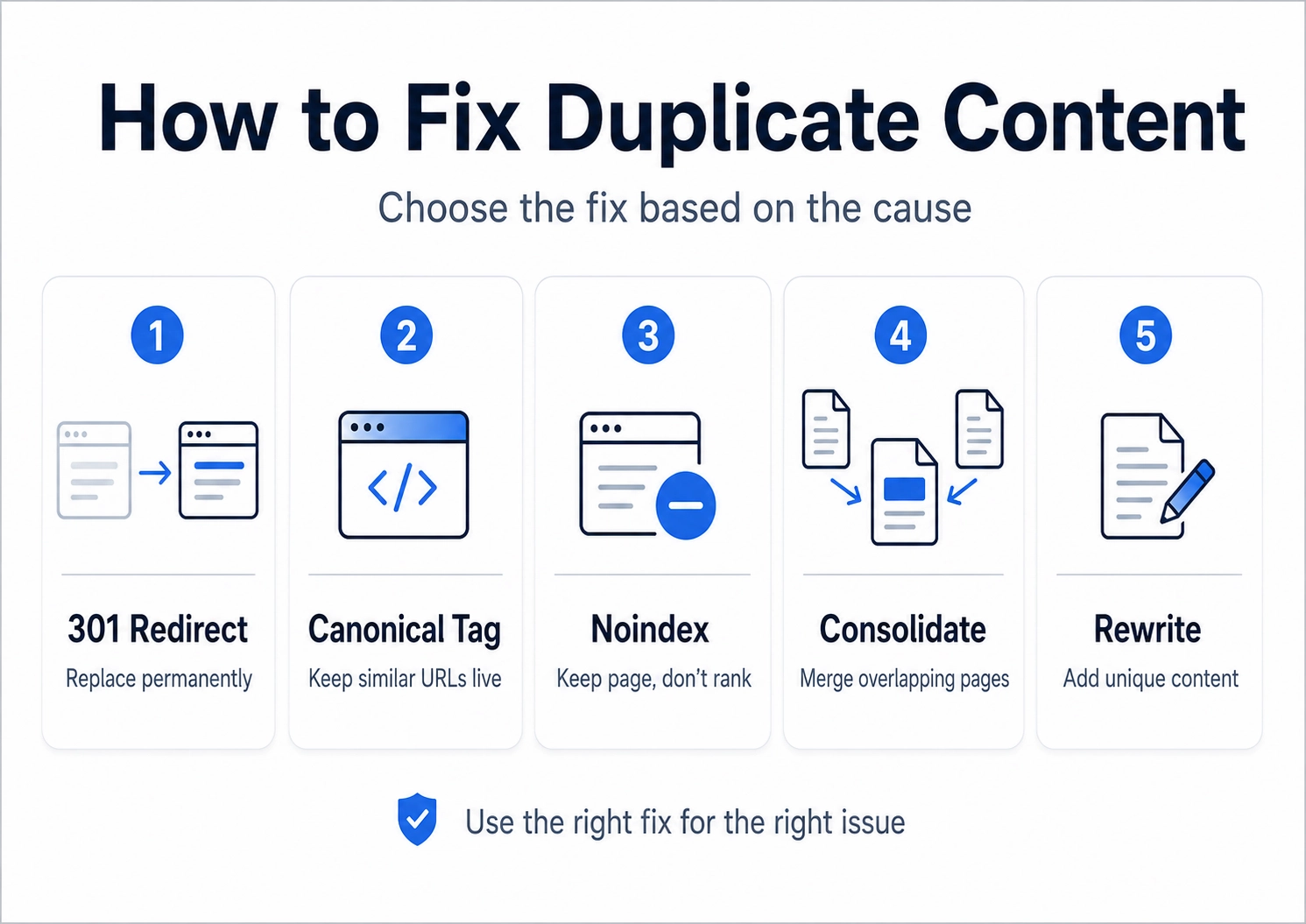
To fix repeated content issues, you first need to determine whether the problem stems from technical URLs, duplicate copy, weak page intent, or conflicting canonical signals.
A 301 redirect works best when one page should permanently replace another. A canonical tag works best when similar URLs must remain live, but only one version should receive the primary ranking signals.
A noindex rule works best for pages that users may need, but Google does not need to show. Content consolidation works best when multiple weak pages cover the same search intent. Rewriting works best when the topic is valid, but the page needs more original content.
Use this simple decision process:
- Use a 301 redirect when the repeated page has no separate purpose.
- Use a canonical tag when duplicate URLs must stay live.
- Use noindex when the page should exist but not rank.
- Use consolidation when several weak pages overlap.
- Use rewriting when the page has a valid standalone intent.
How to Prevent Duplicate Content
Prevention starts with a clean structure and a clear page purpose. Sites should choose one preferred URL format, enforce redirects, use consistent canonical tags, and link internally to the canonical version. XML sitemaps should include only preferred URLs.
Regular audits help catch duplication issues before they grow. Small and mid-sized websites can review this quarterly, while large e-commerce sites, publishers, and programmatic sites may need monthly checks. Audits should review repeated URLs, conflicting canonicals, repeated metadata, overlapping intent, and thin pages.
Duplicate Content SEO FAQs
Is Duplicate Content Bad for SEO?
Yes, it can be harmful when it affects indexing, ranking signals, or user clarity. It does not always cause a direct penalty, but it can reduce the performance of important pages.
Can Duplicate Content Hurt Rankings?
Yes, it can hurt rankings by splitting signals across similar URLs. It can also cause a weaker page to rank instead of the strongest version.
How Much Repeated Content Is Too Much?
There is no fixed percentage that applies to every website. If two pages answer the same query for the same audience, they may be too similar.
What Is the Best Fix for Duplicate Content?
The best fix depends on the cause. Canonical tags, 301 redirects, noindex rules, consolidation, and rewriting each solve different repetition and indexing problems.
Get Expert Support for Duplicate Content Issues
Repeated content can affect indexing, rankings, crawl efficiency, and user experience, especially when technical signals are unclear. A structured audit can help identify the source of the issue and choose the right fix.
If you want to review your site’s duplicate content risks, consult with SSinvent for a technical SEO and content audit.