
Strong alternative text should describe the visual, include relevant terms only when they fit, and stay useful for accessibility. Clear descriptions can support image search, help pages appear in relevant search results, and improve accessibility for users who rely on assistive tools.
The best approach is simple: describe the image accurately, avoid keyword stuffing, and ensure the wording matches the page’s context. At SSinvent, alt text is treated as one part of a broader SEO process that also includes technical structure, content quality, and user experience.
Key Takeaways
- Image descriptions help search systems understand visuals and connect them to the page topic.
- Effective alt text should accurately describe the image, support accessibility, and use keywords naturally.
- Decorative images should usually use an empty alt attribute so screen readers can skip them.
- Good image optimization also depends on crawlable HTML, relevant surrounding content, clear file names, and useful page structure.
- AI tools can create first drafts, but manual review is needed for accuracy, context, and accessibility.
Yes, Image Descriptions Help Search
Written image descriptions help search engines interpret visuals and connect them to surrounding content. They also help screen readers and search engines understand visual content in different ways. This makes image information clearer for users, accessibility tools, and search systems.
A Supporting Signal
This element can enhance visibility, especially in image search, but it does not work on its own. It performs best when the page has useful content, clear headings, crawlable images, and logical structure. It should explain the image in context, not act as a shortcut for rankings. If the surrounding page lacks depth or useful information, the image description cannot compensate for thin content SEO issues.
How Google Uses Image Context
Google can use written image details to understand what appears in a visual and how it relates to the page. The description should match the visible image, the surrounding text, and the content’s purpose. This helps the image support relevant results without relying on repeated keywords.
Is This Part of Technical Search Work?
Image alternatives connect content, accessibility, and technical optimization. They live inside the image HTML as an alt attribute, but their value depends on clear writing and accurate context. That makes them both technical elements and content quality signals.
Alt Tags vs Attributes
People often say “alt tags,” but the correct term is usually alt attribute. This attribute provides a text alternative for an image in HTML. It can help when the description is accurate, specific, and not over-optimized.
This distinction matters because SEO abbreviations and technical terms can shape how clearly teams discuss optimization tasks.
Titles, Captions, and Image Descriptions
The alt attribute describes an image for users and systems when the image needs a text alternative. Image title text may appear as extra browser information, but it is not the main accessibility field. Captions are visible on the page and can add context, but they do not replace the attribute.
Image Indexing and Page Context
Image descriptions work best when search engines can find and process the visual. Standard HTML image elements help crawlers discover important visuals on web pages. Descriptive file names, nearby relevant text, and a clear page topic also help search systems understand the image. Clear internal linking can also support page structure by using SEO abbreviations to guide readers to related information that aligns with the surrounding topic.
How to Write Better Image Descriptions
The best approach is simple: describe the image first, then add keywords naturally only when they fit. The goal is effective alt text that helps users and supports search without sounding forced. A useful image description should explain what appears in the image and why it matters in context.
What Makes a Good Description?
Good wording is accurate, short, and specific. It tells the reader what the image shows without adding unnecessary details. In most cases, keep it under 125 characters so it stays clear for screen reader users.
Best Practices
Write for the person who cannot see the image. Use specific nouns, describe the important subject, and connect the image to the page topic. If a search term fits the image, include it naturally, but do not force it into every visual.
Common Mistakes
The most common mistake is keyword stuffing. Another mistake is using vague text like “image,” “photo,” or “graphic” without useful detail. Repeating the same phrase across many images can also weaken clarity and hurt the user experience.
Alt Text SEO Examples
Examples help show the difference between weak and descriptive alt text. A weak version only labels the image, while a stronger version explains the subject. The right level of detail depends on the image’s role on the page.
Product Image Example
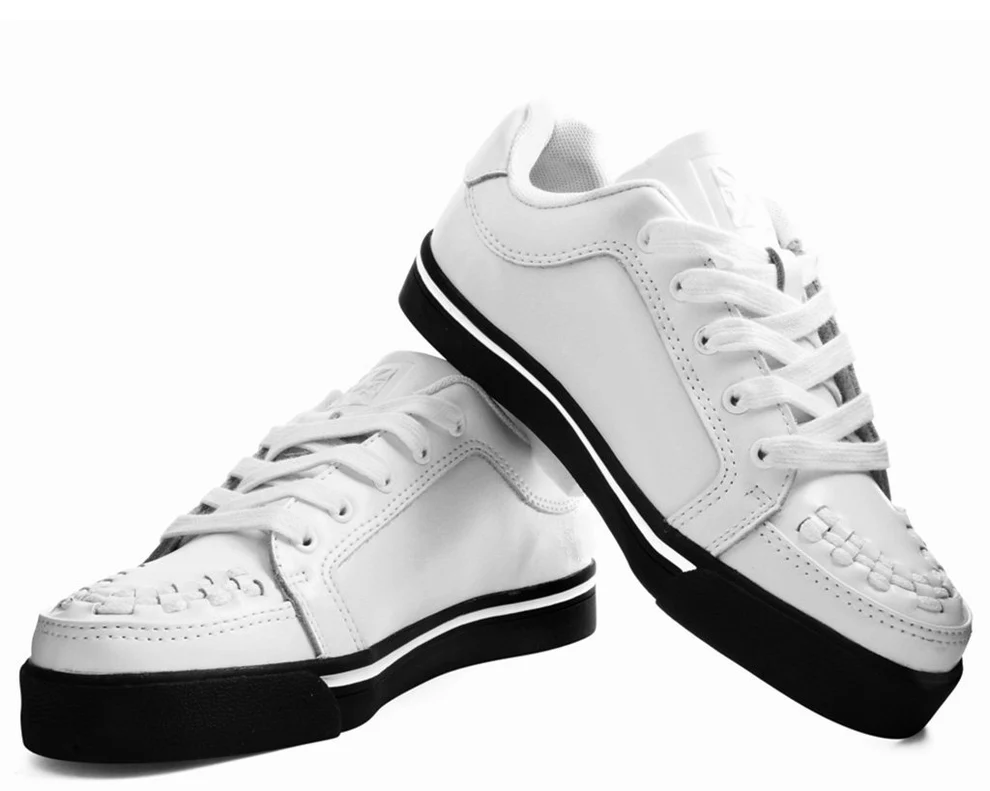
- Weak: “shoes.”
- Better: “white leather running shoes with black soles.”
- Best: “white leather running shoes with black soles for men’s casual training.”
This version works because it identifies the product, color, material, and use without adding unrelated search terms.
Blog Image Example
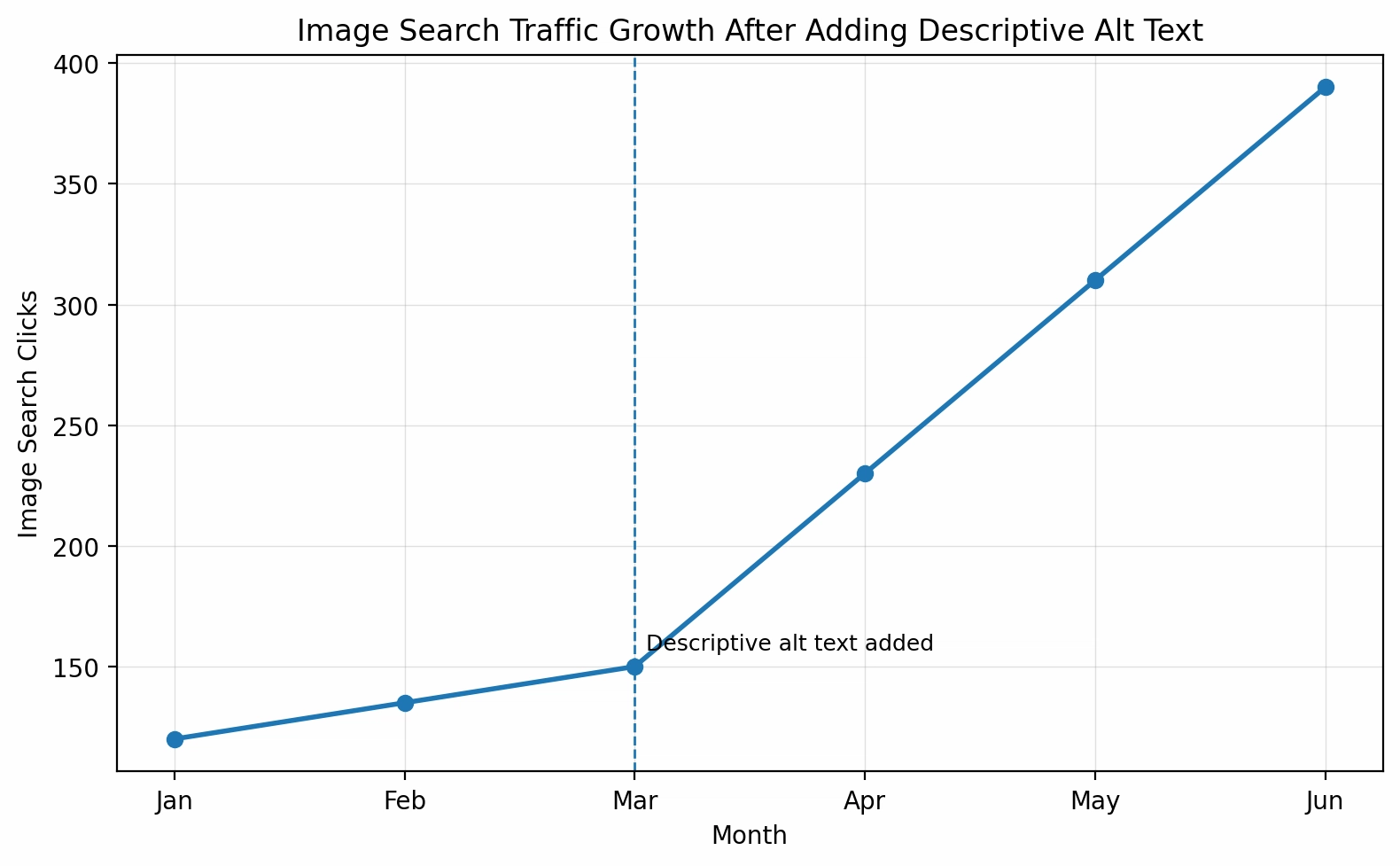
- Weak: “SEO chart.”
- Better: “chart showing image search traffic growth.”
- Best: “chart showing image search traffic growth after adding descriptive alt text.”
This version works because it describes the chart and explains the main context behind the visual.
Decorative Image Example
A decorative image does not add meaning to the page. In that case, an empty alt attribute can be the right choice. This tells assistive technology to skip the image rather than read unnecessary text.
Complex Image Example
Charts, graphs, diagrams, and infographics often require more than a short description because they may convey data, relationships, or steps that are not obvious in a single sentence. The attribute should identify the visual, such as “line chart showing traffic growth by month,” while the surrounding content should explain the main finding.
If the visual includes important numbers or trends, summarize the key takeaway in the body text. This gives users who cannot see the image access to the same core information, not just a label.
Alternative Text for SEO by Platform
The same rule applies to alternative text for SEO on websites, social platforms, and marketplaces: describe the image clearly and match user intent. On websites, adding alt text helps search engines associate images with the page’s topic. On Instagram, Etsy, and similar platforms, clear descriptions can improve accessibility and help systems understand the context of products or posts.
Should You Use an Image Description Generator?
A generator can help create first drafts, especially on large websites with many missing descriptions. These tools can identify visible objects, colors, and simple scenes. Manual review still matters because automated tools may miss context, product meaning, or the image’s purpose.
AI Review Checklist
Review generated descriptions before publishing. A tool may describe what appears in the image, but it may not understand how the image supports the page. Human review helps improve accessibility, accuracy, and search relevance.
Use this checklist:
- Does it describe the image accurately?
- Does it match the page topic?
- Does it avoid keyword stuffing?
- Is it useful for someone using a screen reader?
- Is it short enough to read clearly?
How to Audit Image Descriptions
An audit helps you find missing, weak, repeated, or over-optimized descriptions. Tools such as Lighthouse, WAVE, or a site crawler can help identify missing alt attributes at scale. Manual review is still needed because tools cannot always judge whether the text fits the image and page context.
Final Audit Checklist
A final review helps confirm that each important image has a clear purpose. Meaningful images should have descriptive copy, while decorative images should use an empty alt attribute. Product images, charts, and infographics should include enough context for users and search systems.
Use this checklist:
- Meaningful images have descriptive alt text.
- Decorative images use an empty alt attribute.
- Product images include specific details.
- Charts and infographics include a surrounding explanation.
- Keywords appear only when they fit naturally.
- Duplicate descriptions are fixed.
- Important images are crawlable in the page HTML.
Image descriptions can help search systems understand visuals, but they work best as part of a complete image optimization strategy. Useful page content, crawlable images, relevant surrounding text, and clear descriptions all matter.
For a clearer review of your image SEO, accessibility, and technical structure, you can consult with SSinvent to identify practical improvements across your web pages.