

The best setup combines Divi’s built-in SEO settings with one dedicated SEO plugin, such as Rank Math, SEOPress, Yoast, or AIOSEO. At SSinvent, Rodrigo César and Christopher Cáceres review this type of work in the context of technical SEO, content structure, and WordPress development.
Key Takeaways
- Divi can support strong SEO when the site uses a clean structure, optimized metadata and schema, internal linking, fast loading times, and mobile-friendly layouts.
- Use one dedicated SEO plugin for Divi, such as Rank Math, SEOPress, Yoast, or AIOSEO, to avoid duplicate metadata, conflicting schema, and mixed sitemap settings.
- A step-by-step workflow works better than random edits because it helps you review settings, titles, descriptions, headings, schema, speed, and indexability in order.
- Rank Math and SEOPress are strong options because they help manage page-level SEO controls, search previews, social metadata, schema, robots settings, and XML sitemaps.
- Before publishing a Divi page, check the H1, H2, and H3 structure, metadata, internal links, image optimization, canonical URLs, robots settings, mobile UX, and page speed.
Before You Start
Before editing, confirm that you have WordPress admin access, the Divi WordPress theme or Divi Builder installed, a single main SEO plugin selected, and a clear web development setup to test changes safely. Choose one important post or page as your test page. This gives you a real place to review metadata, headings, schema, speed, links, and indexability.
Prepare these items:
- WordPress admin access
- Divi Theme or Divi Builder
- One SEO plugin
- One test post or page
- Google Search Console
- PageSpeed Insights
- Target keywords
- Internal linking plan
Step 1: Check Divi SEO Settings
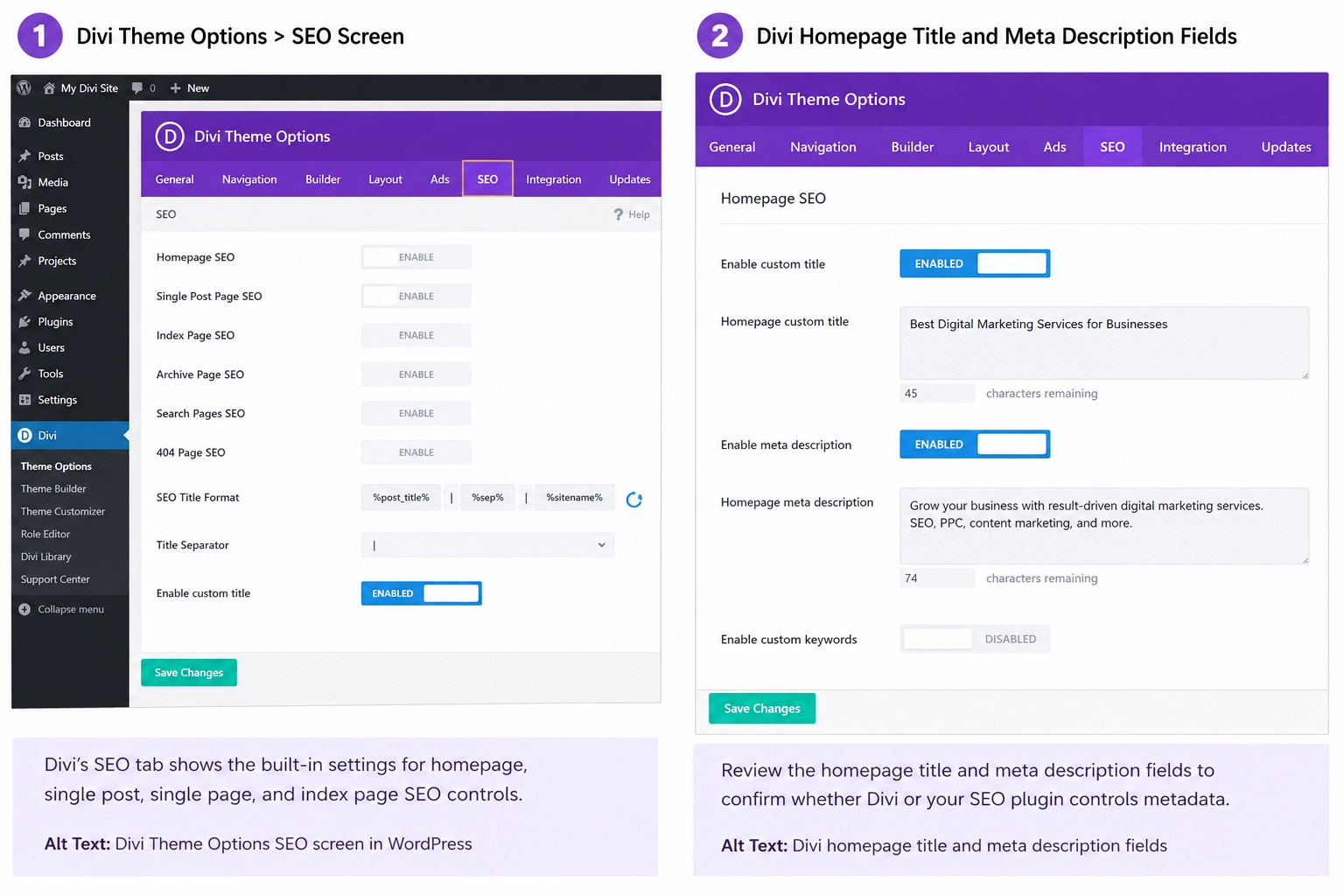
Go to Divi > Theme Options > SEO inside WordPress. Review the built-in seo options for homepage fields, single posts, pages, index pages, custom titles, title separators, and generated titles. These settings can help small sites, but they may conflict with plugin controls if both tools manage the same metadata.
Confirm which tool controls the title and descriptions on your site. If Rank Math, SEOPress, Yoast, or AIOSEO handles metadata, avoid using Divi to manage the same fields. This helps prevent duplicate title tags, repeated meta descriptions, and mixed search engine signals.
Step 2: Choose One SEO Plugin for Divi
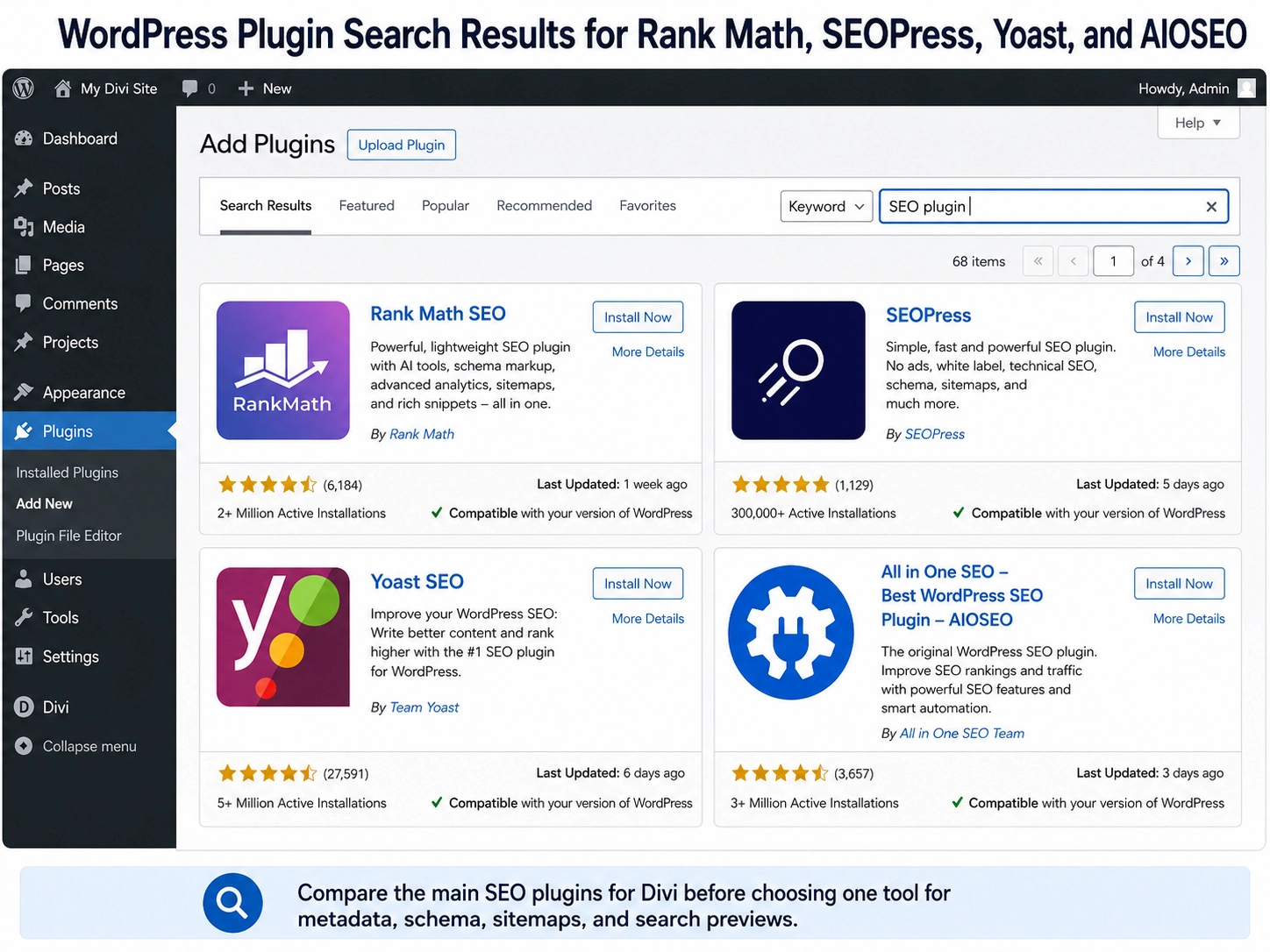
A Divi website usually needs one dedicated SEO plugin to handle metadata, schema markup, XML sitemaps, redirects, robots.txt settings, social sharing data, and canonical URLs. Do not run multiple full SEO plugins simultaneously. Multiple plugins can create duplicate tags, conflicting schema, and mixed sitemap rules.
PluginBest ForMain StrengthPossible LimitRank MathDivi Visual Builder workflowsStrong page-level controlsDense settings for beginnersSEOPressClean technical controlMetadata, schema, sitemaps, redirectsSome features require PROYoastFamiliar WordPress editingReadability and metadata checksLess Divi-specific workflowAIOSEOBroad WordPress SEO setupLocal SEO, schema, redirectsSome tools require paid plans
Step 3: Set Up Rank Math in Divi
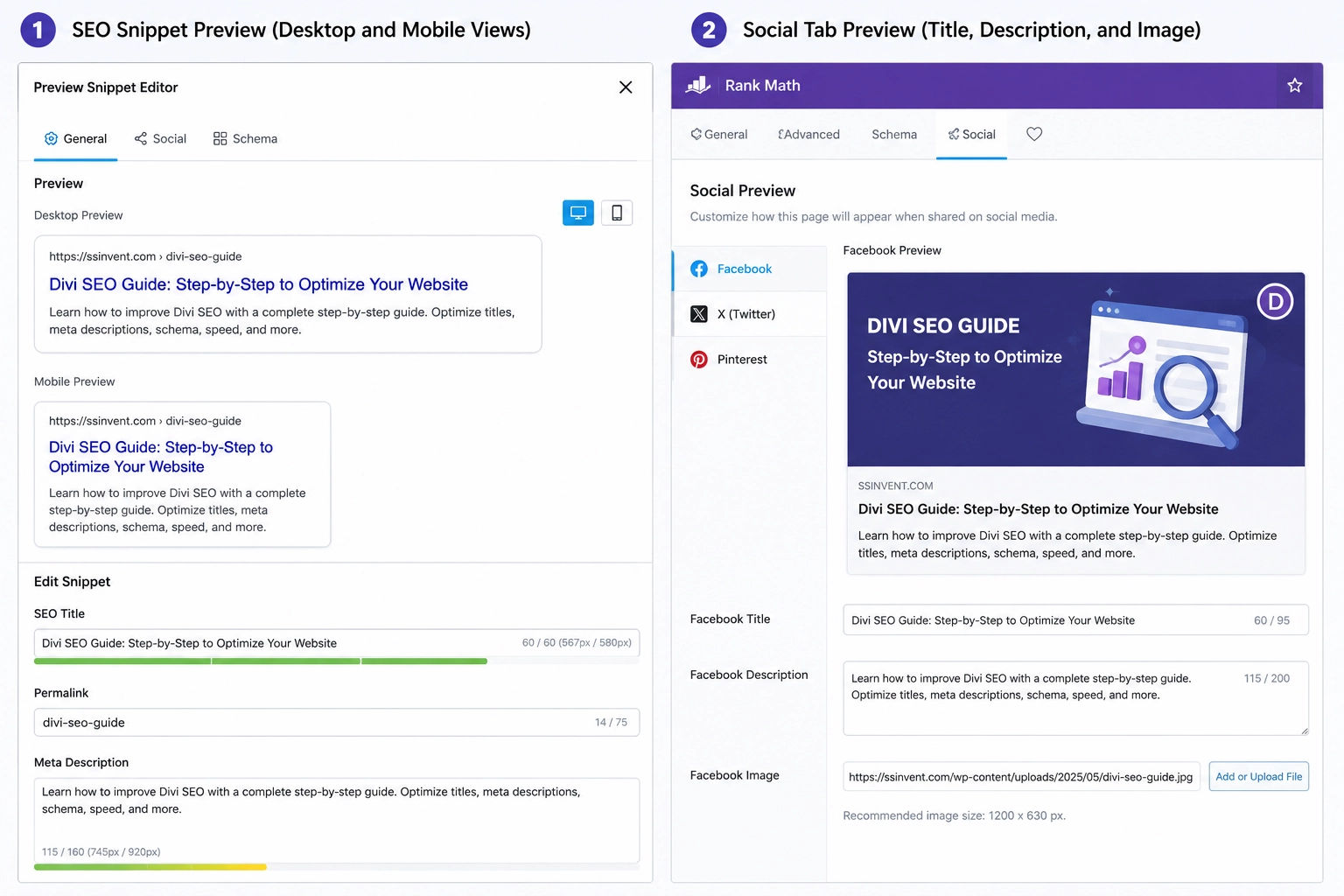
Rank Math SEO works well for users who want SEO controls close to the Divi editing workflow. Go to Plugins > Add New, search for Rank Math, install it, activate it, and complete the setup wizard. Choose the setup mode and site type that match the website, such as business, blog, local business, or ecommerce.
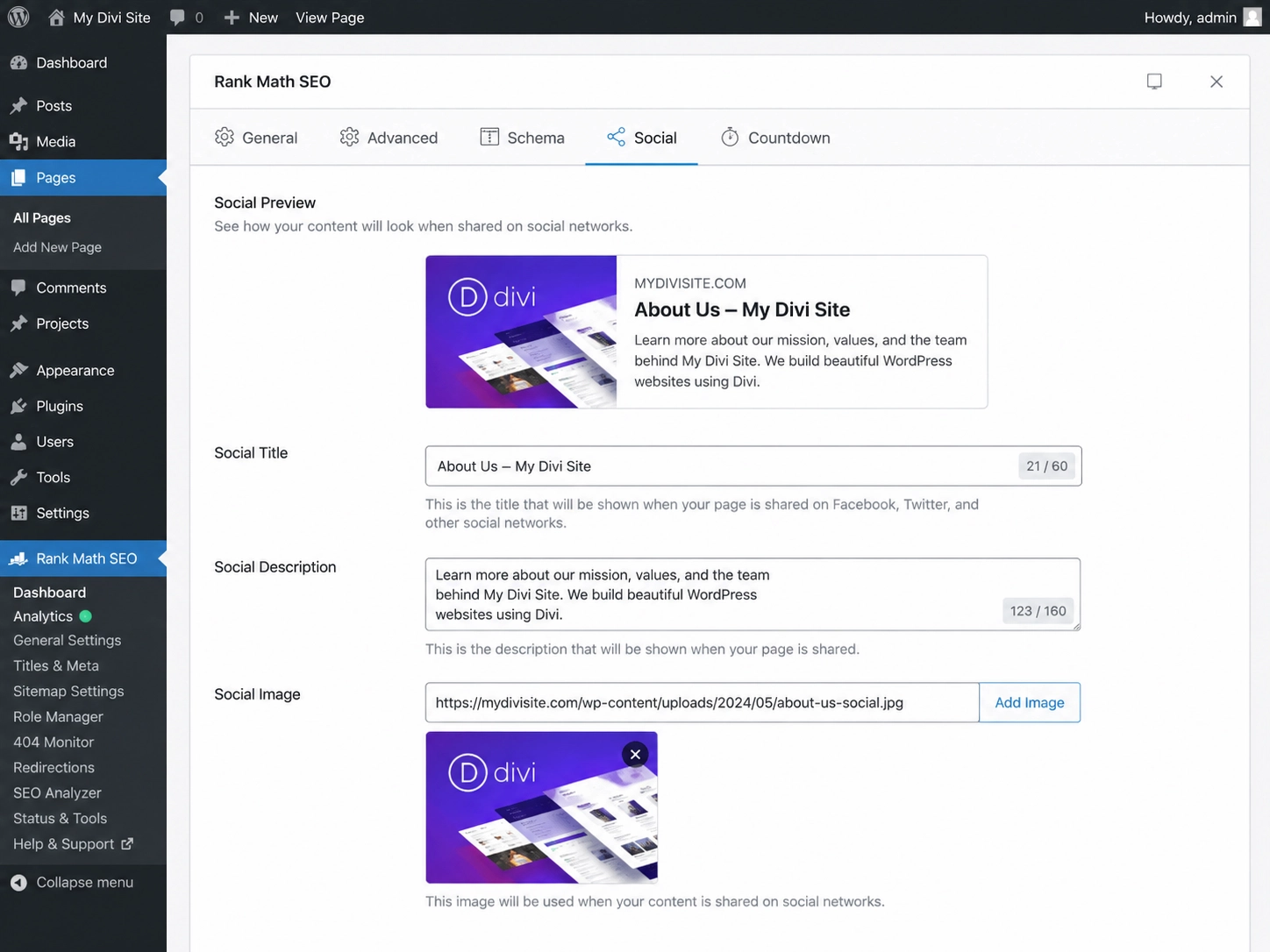
Open the Rank Math dashboard and enable only the modules you need. Common modules include Sitemap, Schema, Redirections, 404 Monitor, Image SEO, and Local SEO. Then open an important page in the Divi Visual Builder and review the Rank Math panel.
Follow this process:
- Add a focus keyword.
- Edit the snippet preview.
- Write the meta title.
- Write the meta description.
- Review the seo score.
- Open the social tab.
- Check the robots’ settings.
- Review canonical URLs.
- Add schema markup if it fits.
Use the score as a checklist, not as final proof of quality. A page can have a strong score and still fail the reader if the content is thin, unclear, or poorly structured. Review the page manually before publishing.
Step 4: Configure Titles and Descriptions
Every important page should have a clear meta title and meta description. The title should state the page topic and include the main keyword only when it fits naturally. The description should explain what the reader will find without promising rankings, traffic, or results.
Example for a Divi service page:
- Meta Title: Divi SEO Services for WordPress Websites
- Meta Description: Learn how technical SEO, content structure, metadata, schema, and page speed can support a Divi website.
- URL Slug: /divi-seo-services/
- Social Title: Divi SEO Services for WordPress Sites
- Social Description: Review a structured process for improving content, speed, metadata, and technical setup on a Divi website.
Some tools may label this area as “title description” or “title and descriptions”. The wording may change by plugin, but the task is the same. Control the search title, page description, URL slug, and social preview from one main tool.
Step 5: Set Up SEOPress for Divi
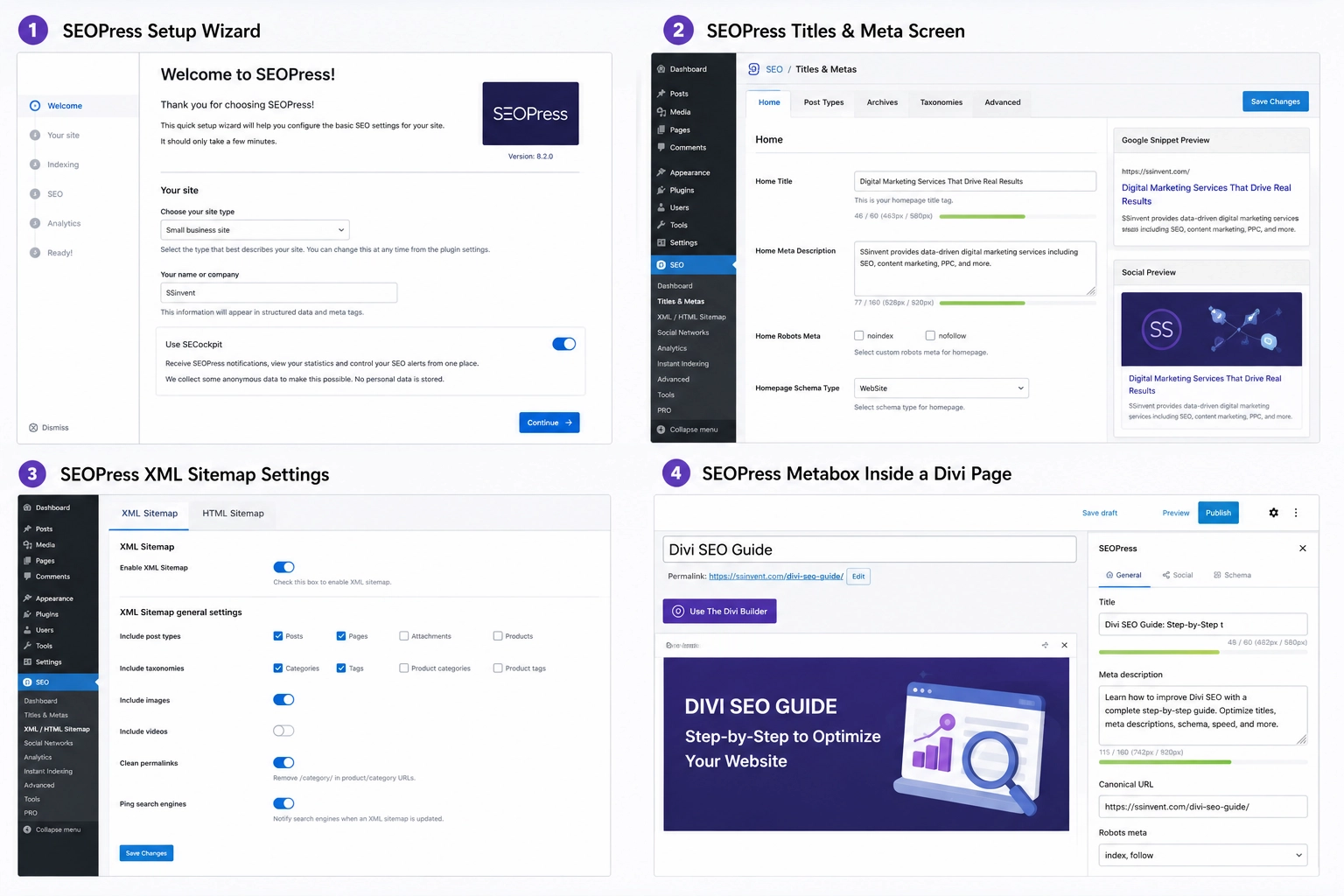
SEOPress can also manage Divi metadata, social tags, schema, robots settings, XML sitemaps, redirects, broken links, breadcrumbs, and Search Console-related features. Install and activate SEOPress from Plugins > Add New. Then run the setup wizard and review the titles, meta, social, sitemap, and schema settings.
Use SEOPress as the main plugin only if your team will maintain it. Edit key page metadata manually inside the page metabox. Then check the XML sitemap, schema fields, robots settings, and canonical field before publishing important pages.
Step 6: Optimize the Divi Page Structure
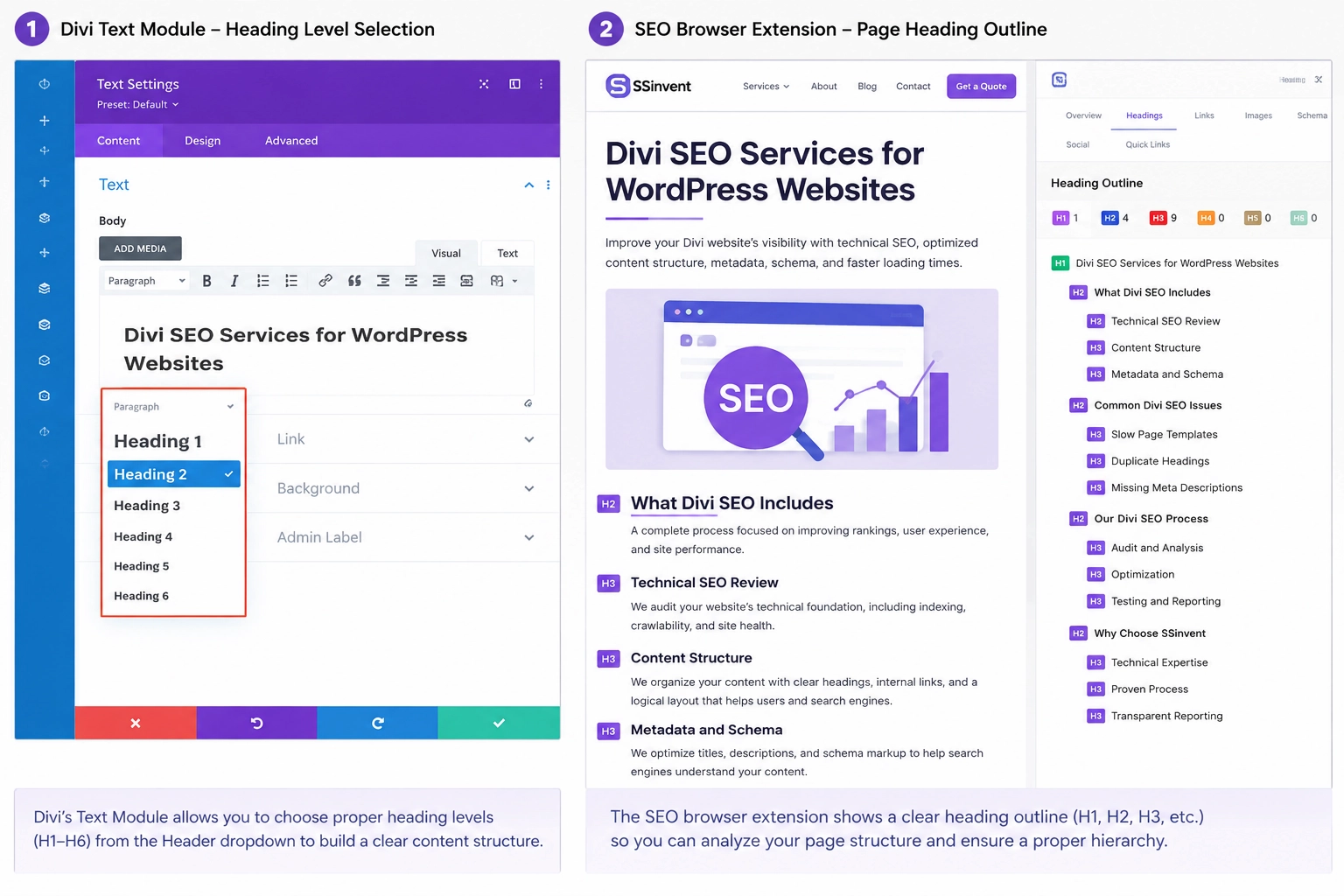
A strong page starts with one clear H1, then uses H2 headings for main sections and H3 headings for supporting details. Do not use heading tags only to control font size. The structure should help users and search systems understand the page order.
Weak structure example:
- H1: Welcome
- H1: Our Services
- H2: SEO
- H2: SEO
- H3: Why Choose Us
- H2: Contact Us
Improved structure example:
- H1: Divi SEO Services for WordPress Websites
- H2: What Divi SEO Includes
- H3: Technical SEO Review
- H3: Content Structure
- H3: Metadata and Schema
- H2: Common Divi SEO Issues
- H3: Slow Page Templates
- H3: Duplicate Headings
- H3: Missing Meta Descriptions
Before publishing, scan the page outline. Each heading should add a new idea. If two headings say the same thing, merge them or make one more specific.
Step 7: Improve Content, Links, and URLs
Match the page to one main search intent. A guide should give steps, examples, settings, and checks. A comparison page should explain differences, use cases, and limits.
Add internal links to related pages that help users continue the task, including service pages, technical resources, and relevant guides, such as a link-building framework, when the page discusses authority growth.
Use descriptive anchor text, such as “technical SEO audit,” “WordPress development services,” or “content optimization process.” Avoid vague anchors like “click here.”
Keep URL slugs short and clear. Use /divi-seo-guide/ instead of a long slug with filler words. The slug should identify the page’s topic without making the page hard to read.
Step 8: Add Schema, Sitemaps, and Canonicals
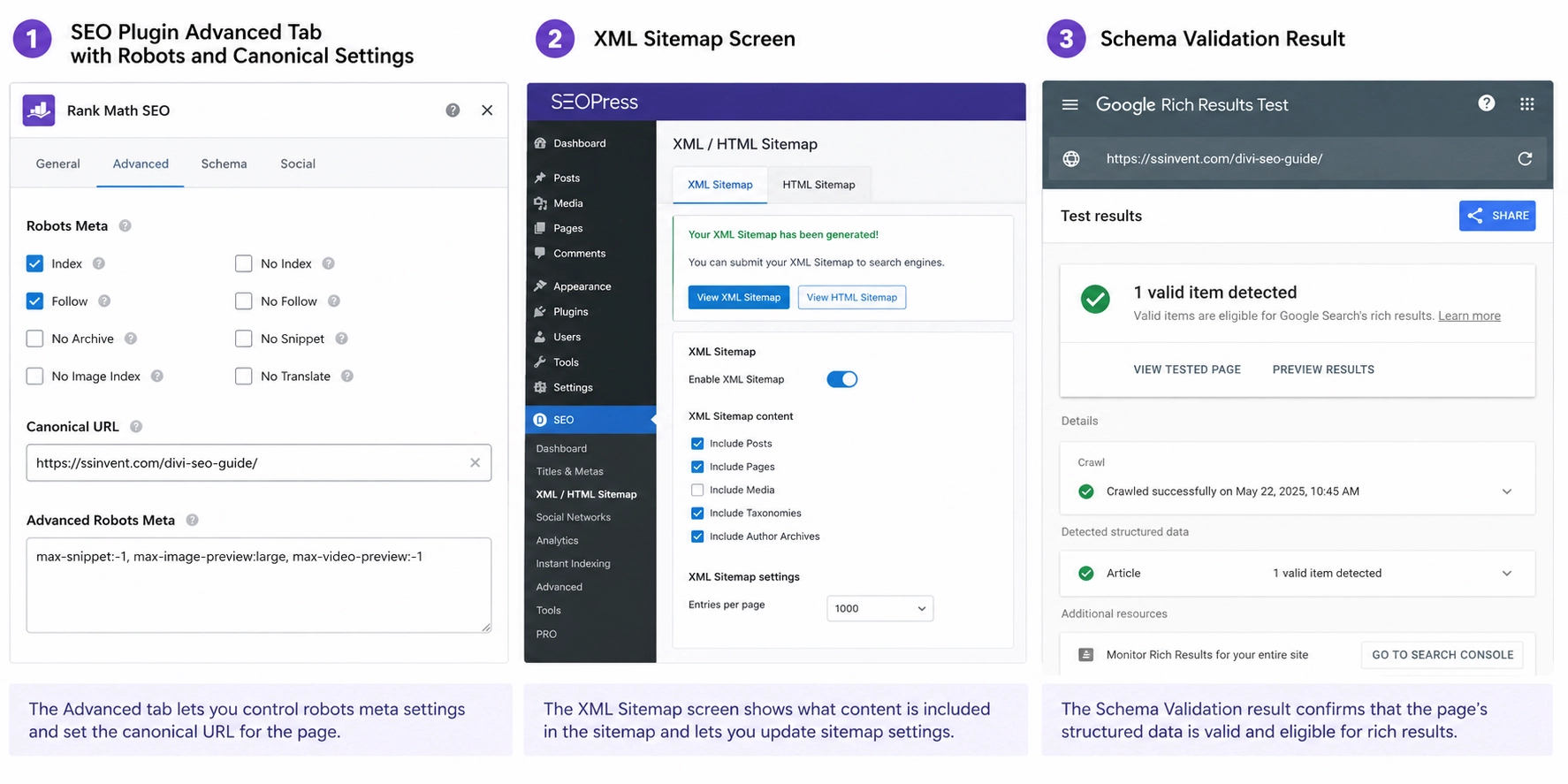
Use schema markup that matches the visible page content. Article schema can fit a blog post, Service schema can fit a service page, and FAQ schema can fit visible FAQ content when supported by your plugin. Do not add structured data that misrepresents the page.
Open your XML sitemap and confirm that important pages appear there. Review canonical URLs in the plugin’s advanced tab when similar pages, tracking parameters, or duplicate versions exist. Check robots settings to make sure important pages are not set to noindex by mistake.
Step 9: Optimize Images, Speed, and Mobile UX
Compress images before uploading them to WordPress. Use proper dimensions, clear file names, and WebP when your setup supports it. Add alt text that describes meaningful images, such as “Rank Math snippet editor inside a Divi page.”
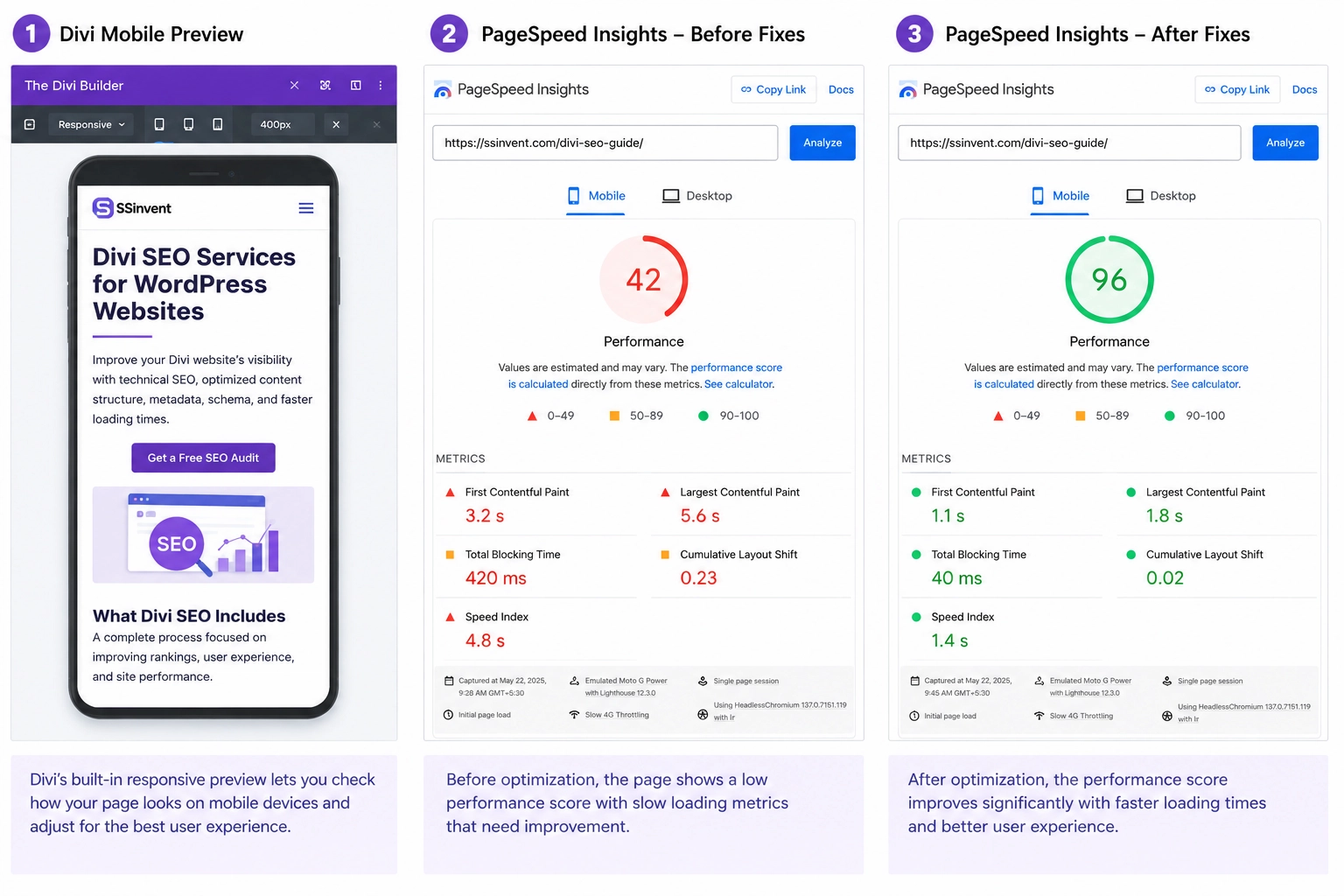
Review the Divi modules on the page. Remove sliders, animations, videos, or background effects that do not help the reader. Then test the page in PageSpeed Insights and review mobile layout, spacing, tap targets, and content order.
Step 10: Complete the Publishing Checklist
Use this checklist before publishing or updating a key page:
- Pass or Fail: The page has one clear H1.
- Pass or Fail: H2 and H3 headings follow a logical order.
- Pass or Fail: The main answer appears early.
- Pass or Fail: The meta title is specific.
- Pass or Fail: The meta description is accurate.
- Pass or Fail: The social tab fields are reviewed.
- Pass or Fail: Schema markup matches the page.
- Pass or Fail: Canonical URLs have been reviewed.
- Pass or Fail: Robot settings do not block important pages.
- Pass or Fail: XML sitemap includes the correct URLs.
- Pass or Fail: Images are compressed.
- Pass or Fail: Mobile layout is readable.
- Pass or Fail: Page speed has been tested.
- Pass or Fail: Broken links have been checked.
This checklist should support human review, not replace it. Read the final page as a user and confirm that the answer appears early. The page should be useful before the design elements are considered.
Divi SEO FAQ
What SEO Plugin Works Best With Divi?
Rank Math and SEOPress are strong options for Divi because they manage page-level SEO controls, metadata, schema, sitemaps, redirects, and robots settings. Rank Math is for users who work within the Divi Visual Builder. SEOPress fits users who want clean technical control.
Does Yoast Work With Divi?
Yes, Yoast can work with Divi. It can manage metadata, perform readability checks, generate XML sitemaps, and cover schema basics. The best choice depends on the editor’s workflow and the site’s technical needs.
How Do I Add SEO to Divi?
Start with one focused topic per page. Then add metadata, headings, internal links, image alt text, schema, clean URLs, robots settings, and page speed checks. Use one main plugin to manage technical fields and search previews.
What Can Hurt Divi SEO?
Weak content, slow layouts, duplicate headings, missing metadata, broken links, and poor mobile experience can hurt performance. Conflicting plugin settings can also create problems. Review important pages before publishing and after major template updates.
When to Hire a Divi SEO Agency
If your Divi site has slow pages, unclear SEO settings, missing metadata, or indexing issues, a technical review can help you find what needs to change.
SSinvent can review your Divi setup, plugin configuration, page structure, performance issues, and related design needs, including affordable web design services for small businesses when layout or usability affects SEO.
Schedule a consultation to understand what is affecting your site and which next steps make sense.