

For large catalogs, strong SEO also depends on unique product metadata, useful category content, XML sitemaps, structured data markup, internal linking, and regular technical audits. These steps help store owners prevent common issues such as duplicate product URLs, thin category pages, slow templates, and poor index coverage.
SSinvent, based in Austin, approaches Magento search optimization as a structured process that connects technical accuracy with clear content and measurable user behavior.
Key Takeaways
- Magento SEO depends on technical setup, content quality, and catalog structure working together. Clean URLs, canonical tags, XML sitemaps, and crawl controls help search engines find the right pages.
- Large catalogs need clear duplicate content rules. Layered navigation, filtered URLs, product variants, and category paths should be managed to prevent low-value pages from competing with stronger pages.
- Product and category pages need unique metadata, useful descriptions, structured data, and relevant internal links. These elements help search engines understand page purpose and help users make better buying decisions.
- Performance matters for both search visibility and user experience. Image compression, caching, Core Web Vitals, and mobile usability should be reviewed across key product and category templates.
- A strong Magento SEO process requires regular audits. Teams should review crawl access, index coverage, metadata gaps, canonicals, structured data, speed, and organic revenue data over time.
Reviewed Approach for Magento SEO
This article follows common technical review areas used for Magento and Adobe Commerce stores. The recommendations should be validated in a staging environment before changes move to production. Store teams should use Google Search Console, a crawl tool, PageSpeed Insights, the platform’s admin settings, and clear SEO formulas to confirm how each change affects crawling, indexing, speed, and page quality.
Magento SEO Best Practices Checklist
A practical checklist helps teams focus on the settings and page elements that most affect search performance. A Magento 2 store often has many product URLs, category paths, filters, and CMS pages, so small errors can spread across hundreds of pages. The checklist should start with the items that affect crawling, indexing, relevance, and user experience.
- Check Crawl and Index Access: Confirm that search engines can crawl and index important product, category, and CMS pages. Review robots.txt, noindex tags, redirects, canonical tags, and server response codes.
- Control Duplicate URLs: Review layered navigation, filtered URLs, sorting parameters, pagination, and product URLs assigned to multiple categories. Use canonical tags, noindex rules, redirects, or dedicated landing pages when needed.
- Optimize Product and Category Metadata: Add unique titles and meta descriptions to important product and category pages. Avoid missing, repeated, or generic metadata that does not clearly describe the page.
- Improve Page Speed: Compress product images, enable caching, reduce heavy scripts, and review Core Web Vitals. Prioritize product and category templates because changes can affect many pages at once.
- Build Internal Links: Link important category pages, product pages, buying guides, and CMS pages in a clear structure. Use descriptive anchor text that helps users and crawlers understand the destination page.
Configure Magento SEO Settings
Start by reviewing the search engine optimization section inside the store configuration and catalog settings. This area controls key fields that affect how products, categories, and pages appear to search engines. It also helps teams check whether the default settings meet the store’s needs.
For many stores, the main configuration review starts in Stores > Configuration. Product and category fields are usually managed from Catalog > Products or Catalog > Categories, while URL rewrites are usually reviewed from Marketing > SEO & Search > URL Rewrites. XML sitemap settings are commonly found under Stores > Configuration > Catalog > XML Sitemap, and robots.txt settings are often managed from Content > Design > Configuration > Search Engine Robots.
Optimize Product and Category Metadata
Product and category metadata helps search engines understand the purpose of each page. A strong meta tag for products should clearly describe the item, include important search terms, and match the page content. A strong meta tag for categories should explain the product group and support broader commercial queries.
The title meta description pairing should be unique for important pages. Titles should identify the product, category, brand, or use case. Descriptions should summarize the page’s value without making claims it does not support.
A product title should describe the item clearly and avoid repeated phrases. A useful format can include the product name, key attribute, and brand when relevant. For example, a product page could use “Black Ergonomic Office Chair | Brand Name” if that title matches the visible page content.
Use Clean URLs and Rewrites
Clean URLs help users and crawlers understand the page’s context before they open it. A clean product URL should avoid unnecessary numbers, session IDs, and confusing parameters. A clean category URL should reflect the store hierarchy without becoming too long.
URL rewrites help preserve traffic and prevent broken links after URL changes. When a product, category, or CMS page changes its URL, the old path should point to the correct new location. Store teams should avoid redirect chains and map old URLs to the closest relevant page.
Enable XML Sitemaps and Schema
An XML sitemap provides search engines with a clear list of pages to discover. It should include valuable product pages, category pages, and relevant CMS pages while excluding low-value URLs, duplicate filter pages, and pages that should not rank. Teams should submit the sitemap in Google Search Console and review processing errors.
Product schema markup helps search engines understand structured product details. Common fields include product name, image, brand, SKU, price, currency, availability, and offer details, when applicable. The markup should not add reviews, ratings, prices, or availability details that are not visible or accurate.
Is Magento SEO Friendly?
Magento can support strong search performance when teams configure it correctly. The platform includes useful features for metadata, URL keys, sitemaps, rewrites, and category structure. It also gives larger catalogs more control than many simpler ecommerce platforms.
The main issue is that built-in features do not solve every problem automatically. Large catalogs create duplicate URLs, thin pages, slow templates, and crawl waste when teams do not manage them. Magento is flexible, but that flexibility requires careful setup.
Built-In Features and Limits
Magento includes several tools that support organic visibility. Store teams can edit metadata, create URL rewrites, control sitemaps, manage robots.txt, and adjust catalog search engine optimization settings. These features give teams a starting point for a structured seo strategy.
Default settings may not match the needs of every store. A store with many filters, variants, and categories may create duplicate or low-value URLs if rules are not defined. Store owners should treat default settings as a baseline, not a complete system.
Why SEO in Magento Needs Setup
SEO in Magento needs setup because ecommerce websites change often. Products go out of stock, categories expand, URLs change, and filters create new paths. Each change can affect how search engines crawl and index the site.
Setup also helps connect technical choices with business goals. A page that ranks but does not match buyer intent may attract weak traffic. A page that loads slowly or lacks product detail may fail to support the user’s next step.
Magento SEO Optimization for Crawling
Crawling controls how search engines discover pages. For large stores, crawl management matters because not every URL deserves the same attention. Magento SEO optimization should help crawlers find valuable pages and avoid repeated or low-value paths.
Crawl issues often appear when filters, sorting options, internal search pages, and duplicate category paths create many URL versions. These pages may compete with stronger pages or waste crawl resources. A clear technical plan helps search engines focus on pages that should rank.
Manage Robots.txt
Robots.txt provides search engines with instructions on how to crawl specific areas of the site. It can help reduce access to internal search pages, checkout pages, cart pages, and other areas that do not need organic visibility. It should not block pages that need to rank.
A robots.txt review should confirm that important product, category, and CMS pages remain crawlable. Teams can use robots.txt to reduce crawling of internal search pages, cart pages, checkout pages, and low-value parameter paths. After each change, teams should test important URLs.
Control Faceted Navigation
Faceted navigation lets users filter products by size, color, price, brand, and other attributes. This improves shopping usability, but it can create many URL combinations. If search engines crawl all combinations, the site may generate duplicate or thin pages.
A filtered page may deserve indexation if it matches real keyword demand, has enough products, and offers a useful landing page experience. If the filtered page only repeats a parent category with minor changes, it should usually avoid competing with that stronger page. Teams can use canonical tags, noindex rules, or dedicated landing pages depending on the value of the filtered URL.
Manage Canonical Tags
Canonical tags help search engines identify the preferred version of a page when similar URLs exist. A canonical link meta tag is useful when products appear in multiple categories or when filtered URLs create near-duplicate pages. It sends a clear signal about which URL should consolidate ranking signals.
If one product appears in several categories, the canonical should point to the preferred product URL. If a filtered category URL has no unique search value, the canonical can point to the main category page. Each canonical target should be indexable, relevant, and accessible.
Monitor Index Coverage
Index coverage shows which pages search engines have discovered, indexed, excluded, or flagged. This data helps teams see whether important pages can appear in search results. It also reveals blocked pages, duplicate pages, redirect issues, and soft 404 problems.
Coverage should be reviewed after product imports, migrations, and template changes. A rising number of excluded pages is not always a problem, but it needs context. The key question is whether valuable pages are available and easy to understand.
Which Magento Pages Should Rank?
Not every page in a Magento store should appear in search results. Product pages, category pages, CMS pages, filtered pages, and internal search pages serve different purposes. A strong indexation plan decides which pages should rank and which pages should only support browsing.
Product pages should usually rank when they have unique demand, stable inventory, and helpful content. Category pages should rank when users search for a group of products, such as a product type, brand category, size group, or use case. Filtered pages should only rank when they match real search demand and offer enough unique value.
Cart pages, checkout pages, account pages, internal search results, session URLs, and most parameter pages should usually not rank. These pages do not serve search intent and may create crawl waste. A controlled index usually supports easier audits and stronger page quality.
Magento SEO Tips for Store Content
Content helps search engines connect pages with user intent. Product and category pages should answer questions that buyers ask before they compare, choose, or purchase. Magento SEO tips should focus on useful page content rather than repeated keywords.
Unique product descriptions help each page stand apart. Manufacturer descriptions often appear on many websites, making it harder for a page to show distinct value. A custom description should explain the product, its features, and the buyer need it solves.
Category pages often target broader commercial searches. These pages should explain what users will find, how to compare products, and which features matter. A short content block can help without pushing products too far down the page.
Image alt text helps describe images for accessibility and search understanding. Product images should use clear descriptions that identify the item and important visible attributes. Buying guides can also support informational searches and link naturally to related products or categories.
Optimize Magento Site Structure
Site structure affects crawlability, navigation, and relevance. A clear structure helps users move from the homepage to categories, subcategories, products, and supporting content. It also helps search engines understand which pages are most important.
Category paths should reflect how users shop. They should group products in ways that make sense by type, use, brand, or need. Clear paths also help teams write better metadata and page copy.
Breadcrumbs show users where they are inside the site. They also help search engines understand page hierarchy. A stable breadcrumb structure improves navigation and maintenance.
Internal links pass context between related pages. Category pages should link to relevant subcategories, guides, and high-value products. Anchor text should clearly describe the destination page.
Improve Technical SEO Performance
Technical performance affects how users and crawlers interact with the store. Slow pages can create poor engagement and make large catalogs harder to crawl. Performance work should focus on speed, stability, mobile usability, and clean rendering.
Product images often create large page weight. Large files slow down category pages and product pages, especially on mobile connections. Teams should use modern image formats when supported, define image dimensions, and avoid loading images users cannot see yet.
Caching stores page elements so the server does not need to rebuild every request from scratch. Magento stores should use caching carefully because price, stock, cart, and user data may change. Cached pages must still show accurate product and checkout information.
Core Web Vitals measure page experience signals such as loading performance, interactivity, and visual stability. Common issues include large images, render-blocking scripts, layout shifts, and heavy third-party tools. Mobile usability should also be checked across menus, filters, forms, image galleries, and checkout paths.
What Is the 80/20 Rule for SEO?
The 80/20 rule means a small group of actions often creates most of the practical impact. For a store, this means teams should not treat every page or issue as equal. They should find the pages, templates, and technical blockers that affect the largest share of organic traffic or revenue.
High-impact pages usually include top categories, best-selling products, high-margin items, and pages that already receive impressions. Priority should come from data, not opinion. The best first fixes often sit where visibility, demand, and business value overlap.
Magento SEO Audit Workflow
A Magento SEO audit should follow a clear order. This prevents teams from fixing small wording issues while larger technical problems remain unresolved. The audit should move from crawl access to index quality, then to page relevance, performance, and measurement.
The workflow should repeat after major changes. Product imports, theme updates, migrations, extension installs, and category edits can create new issues. Regular checks help keep the store stable as it grows.
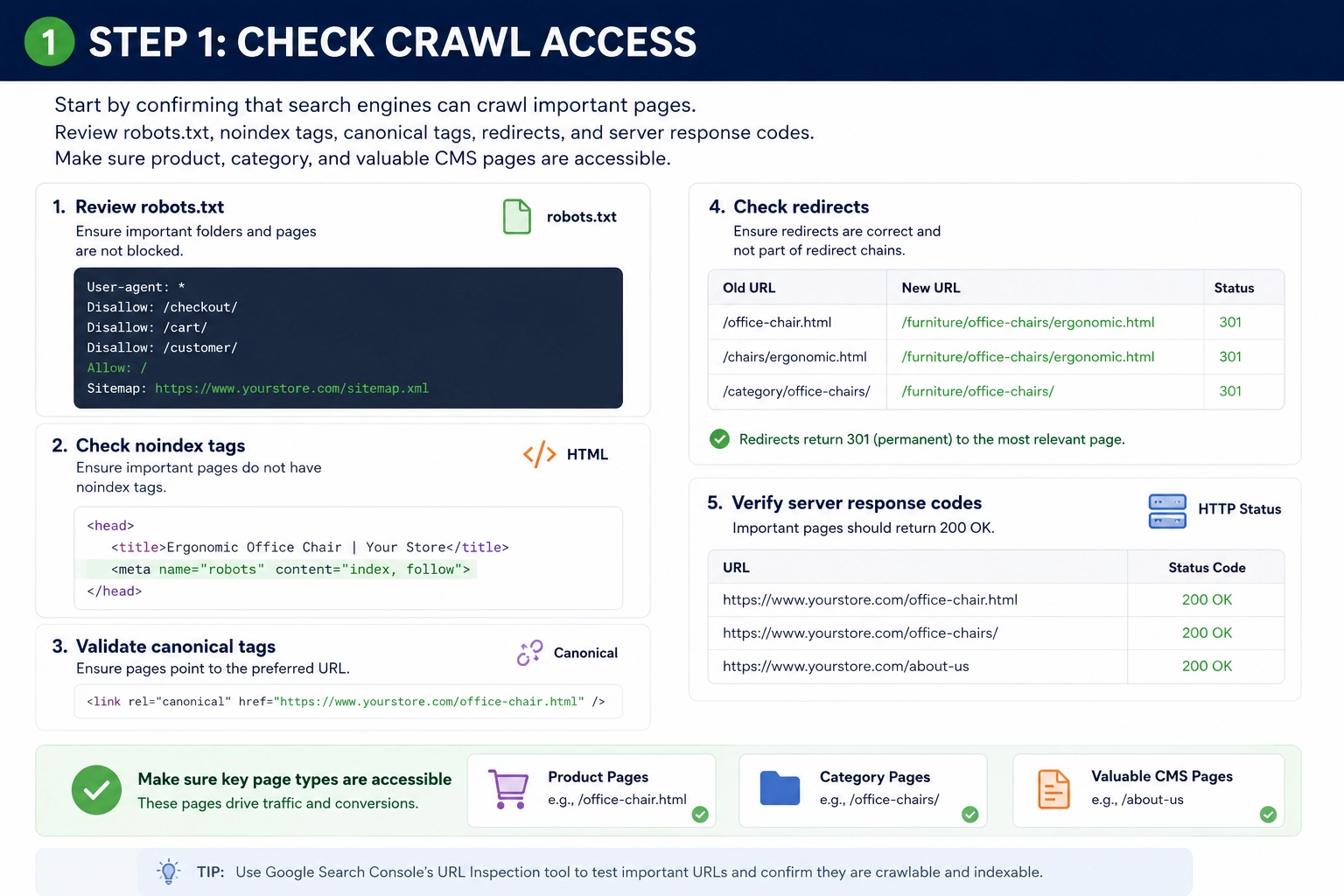
Step 1: Check Crawl Access
Start by confirming that search engines can crawl important pages. Review robots.txt, noindex tags, canonical tags, redirects, and server response codes. Make sure product, category, and valuable CMS pages are accessible.
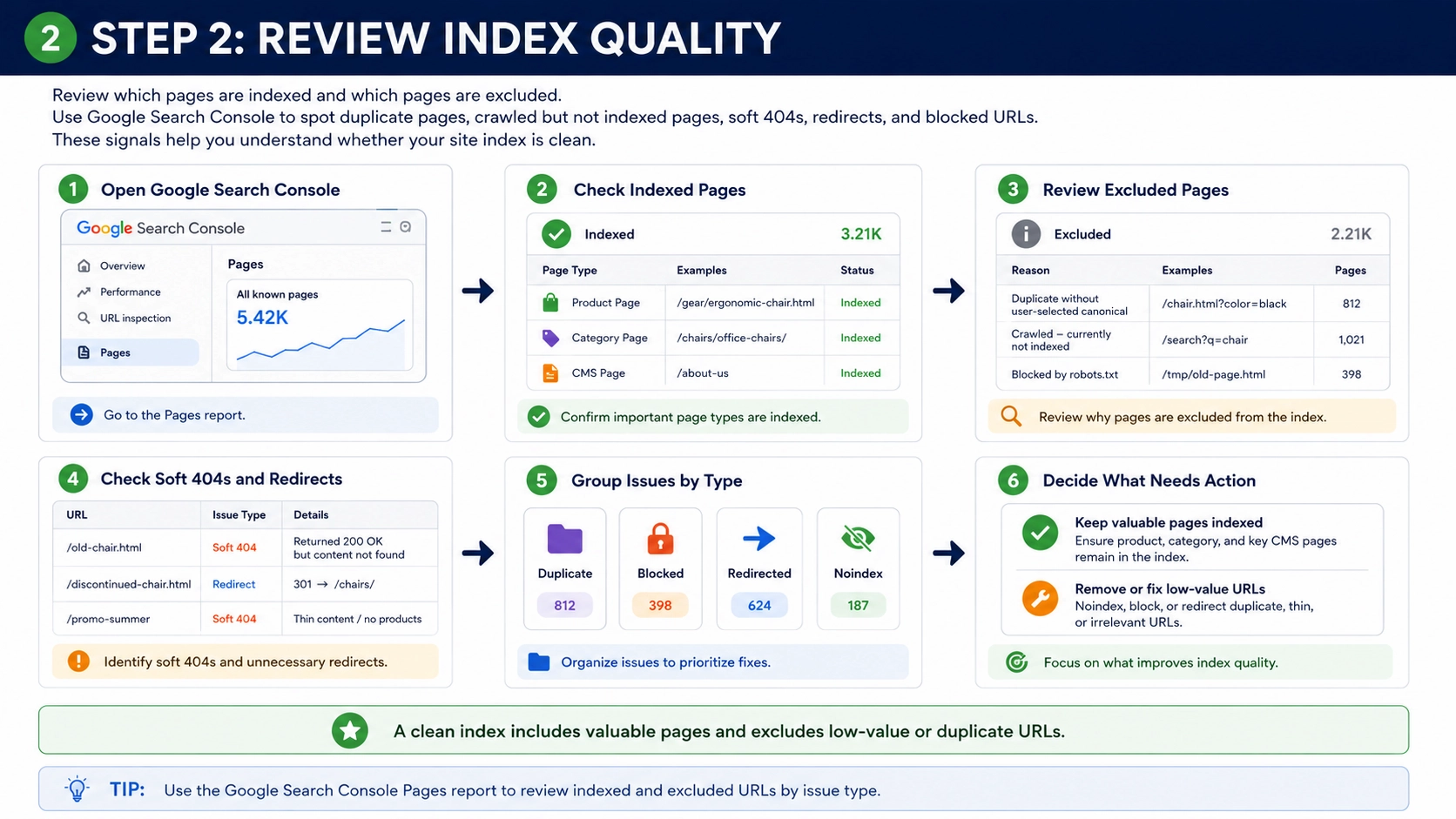
Step 2: Review Index Quality
Next, review which pages are indexed and which pages are excluded. Google Search Console can show duplicate pages, crawled-but-not-indexed pages, soft 404s, redirects, and blocked URLs. These signals help teams understand whether the site index is clean.
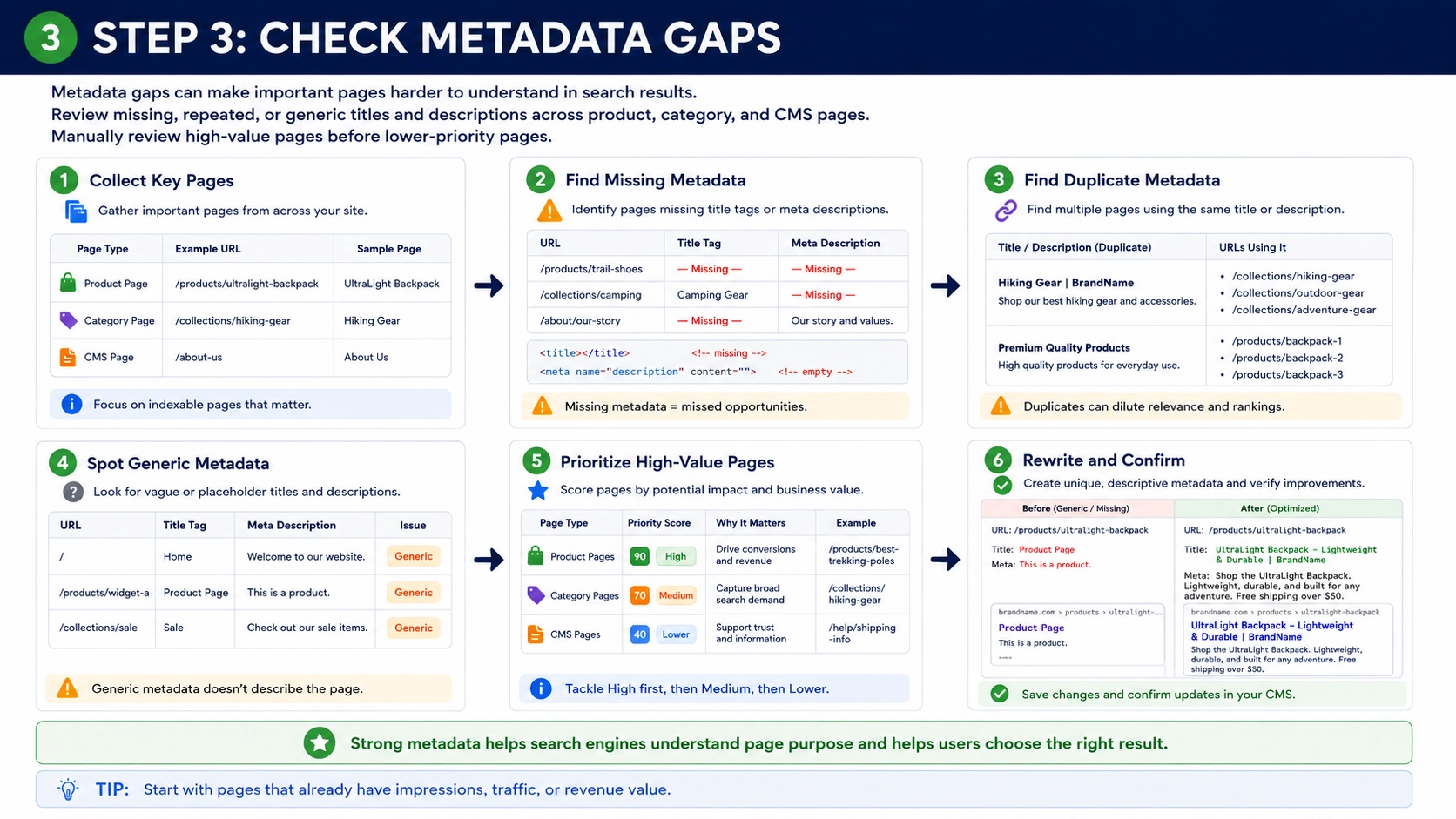
Step 3: Check Metadata Gaps
Metadata gaps can make important pages harder to understand in search results. Teams should review missing, repeated, or generic titles and descriptions across product, category, and CMS pages. High-value pages should receive manual review before lower-priority pages.
Step 4: Review Duplicate URLs
Duplicate URLs often come from layered navigation, sorting, pagination, and products assigned to multiple categories. These duplicates can compete with stronger pages or waste crawl resources. Teams should group duplicate patterns by cause before choosing a fix.
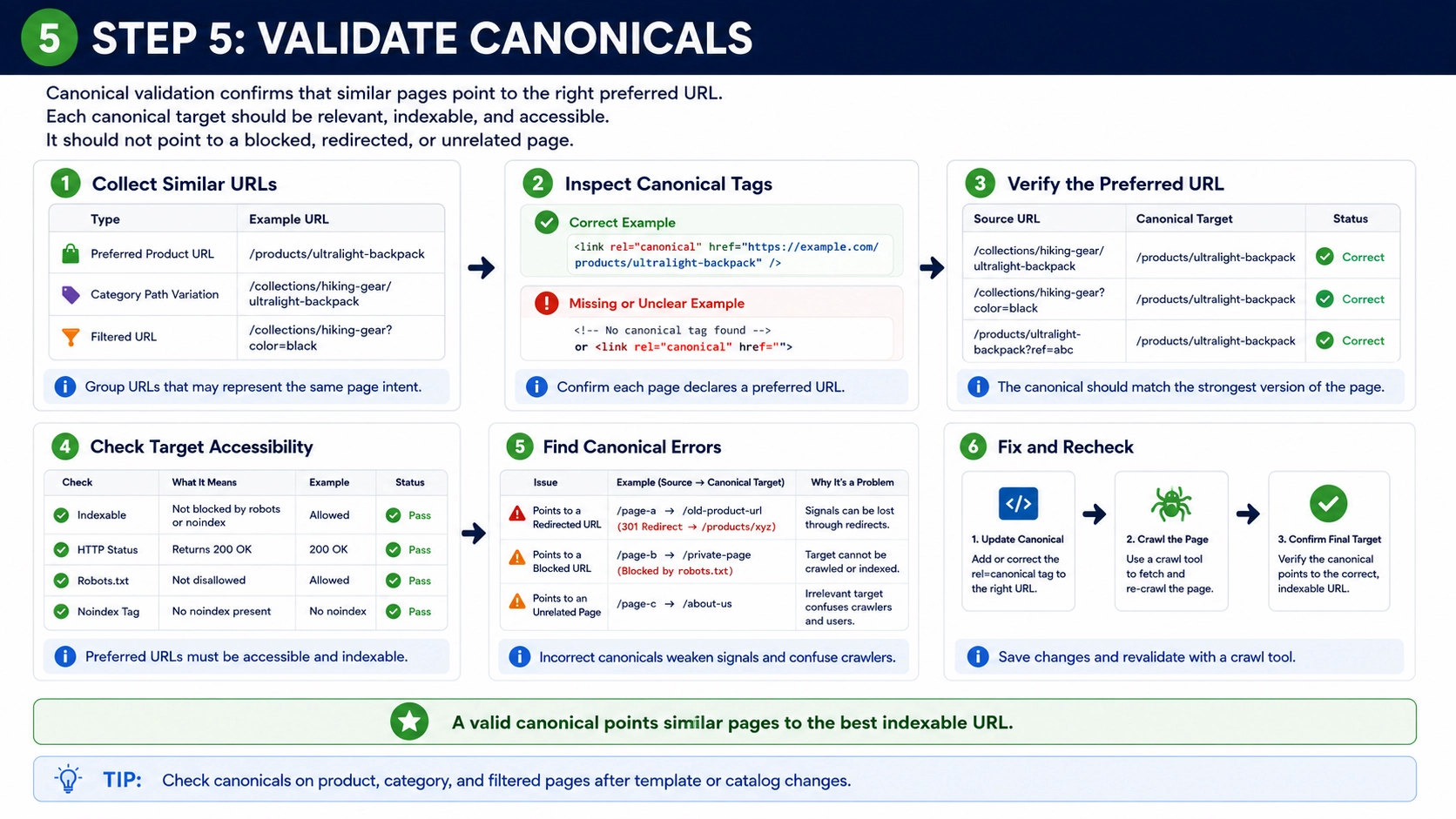
Step 5: Validate Canonicals
Canonical validation confirms that similar pages point to the right preferred URL. Each canonical target should be relevant, indexable, and accessible. It should not point to a blocked, redirected, or unrelated page.
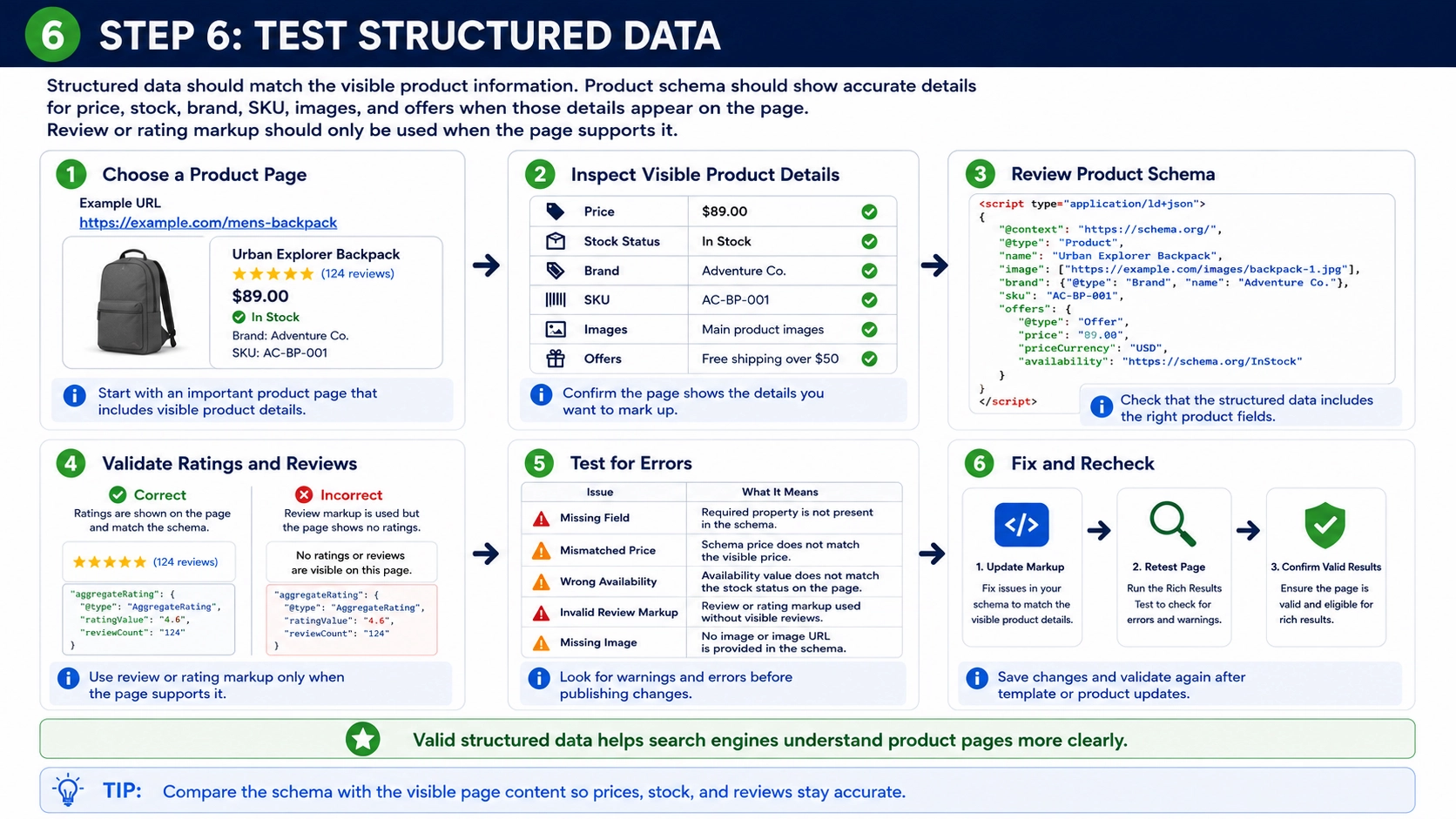
Step 6: Test Structured Data
Structured data should match the visible product information. Product schema should show accurate details for price, stock, brand, SKU, images, and offers when those details appear on the page. Review or rating markup should only be used when the page supports it.
Step 7: Measure Speed and Mobile Usability
Speed and mobile usability affect both users and search engine processing. Teams should test product pages, category pages, and important CMS pages because each template can behave differently. Large images, scripts, layout shifts, and heavy extensions are common issues.
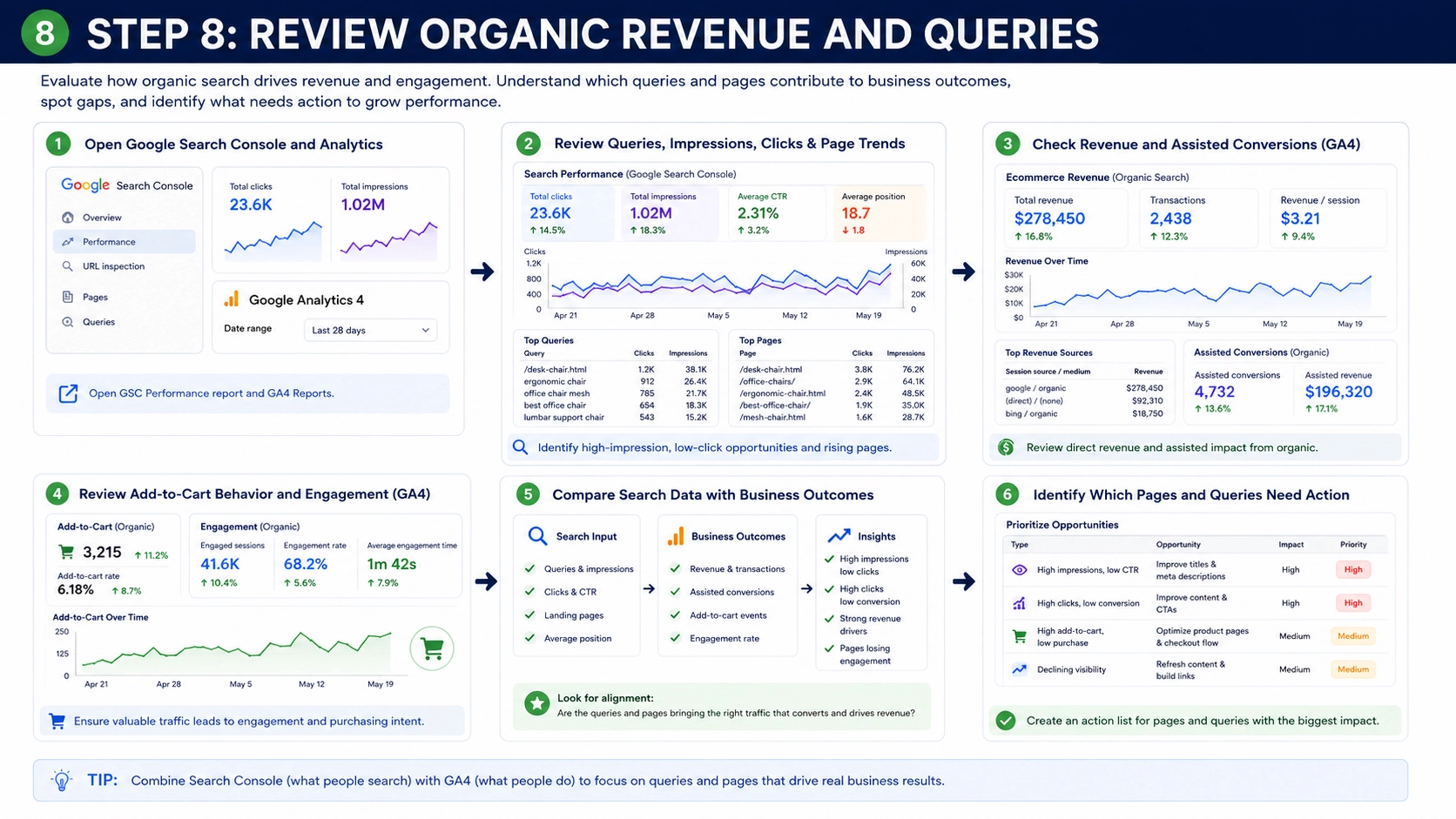
Step 8: Review Organic Revenue and Queries
The final audit step connects technical work with real search behavior. Google Search Console can show queries, impressions, clicks, and page trends. Analytics data can show revenue, assisted conversions, add-to-cart behavior, and engagement.
Track Magento SEO Results
Tracking helps teams measure whether changes support search visibility and user behavior. It also helps separate useful improvements from changes that only look good in theory. A clear tracking plan should connect rankings, crawl status, traffic, engagement, and revenue.
Google Search Console shows impressions, clicks, average position, indexing status, sitemap processing, and page experience data. Analytics data can show revenue, assisted conversions, add-to-cart behavior, and engagement. Store teams should review performance by page type because product pages, category pages, and guides often behave differently.
Verification should be part of tracking. XML sitemaps should be checked in Google Search Console, robots.txt changes should be tested against important URLs, and redirects should be crawled to confirm one-hop behavior. Canonicals, schema, and index coverage should also be reviewed after template or catalog changes.
Common Magento SEO Mistakes
Common Magento SEO mistakes often come from scale, default settings, or incomplete review. A small issue on one template can affect thousands of URLs, so teams need a clear process to prevent repeated problems.
- Leaving default metadata can make important pages look generic in search results. Product and category pages should use specific titles and descriptions that match the page content and user intent.
- Ignoring layered navigation can create duplicate and low-value URLs. Filtered pages should be reviewed carefully so they do not compete with stronger category or product pages.
- Missing redirects after URL changes can create 404 errors and lost internal link value. Old URLs should point to the closest relevant active page when products, categories, or CMS pages change.
- Thin product pages can make it harder for users and search engines to understand value. A useful product page should answer practical questions about specifications, features, fit, use cases, care details, and related products.
Magento SEO FAQs